
Code inputs, imports, and outputs
The Code step receives the same workflow context available elsewhere in QuickFlo. Return an object with named fields when downstream steps need to use the result.
What’s available in scope
Section titled “What’s available in scope”These values are available directly. You do not need to import them:
| Binding | What it is |
|---|---|
$env | Your environment variables, such as $env.STRIPE_SECRET |
$connections | Your connection credentials by name. e.g. $connections['my-salesforce'].accessToken |
$steps | Outputs from every step that ran before this one in the same workflow, keyed by step ID. e.g. $steps['fetch-customer'].body.email or $steps['parse-csv'].items |
$vars | Workflow variables set by Set Variable steps. e.g. $vars.customerName |
$errors | Operational errors emitted by prior steps in this run |
$execution | The current run’s ID, workflow, environment, and start time |
initial | The data that started the workflow, such as initial.city or initial.form.email—see Initial data |
When the Code step runs inside a for-each, extra iteration bindings are also in scope — the same ones Liquid templates see as {{ $item }}, {{ $index }}, etc.:
| Binding | What it is |
|---|---|
$item | The current item from the for-each list |
$index | The current iteration’s zero-based index |
$isFirst | true on the first iteration |
$isLast | true on the last iteration |
$indexPath | Iteration indexes across nested loops, outermost first, such as [0, 2] |
Outside a for-each, the iteration bindings are undefined.
Field references that work in Liquid templates work the same way in code. {{ fetch-customer.body.email }} in a Liquid string is $steps['fetch-customer'].body.email in a code step.
Imports
Section titled “Imports”You can import packages and modules directly:
| Source | Syntax |
|---|---|
| npm | import phoneNumber from 'npm:libphonenumber-js' |
| jsr | import { parseCSV } from 'jsr:@std/csv' |
| HTTPS URL | import { z } from 'https://esm.sh/zod' |
| Standard packages | Packages published under @std |
Keep imports at the top of the script:
import parsePhoneNumber from 'npm:libphonenumber-js'import { DateTime } from 'npm:luxon'
const phone = parsePhoneNumber('+1 415 555 0100')const reportedAt = DateTime.now().setZone('America/Los_Angeles')
return { phone: phone.formatInternational(), country: phone.country, reportedAt: reportedAt.toFormat('EEEE, MMM d, yyyy h:mm a ZZZZ'),}Console output
Section titled “Console output”Anything you console.log, console.info, console.warn, console.error, etc. is captured and shown in the Console Output panel below the editor when you Run the step, and in the execution trace when the workflow runs in production.
for (let i = 0; i < 100; i++) {  console.log({ message: `hello ${i}` })}
return { processed: 100 }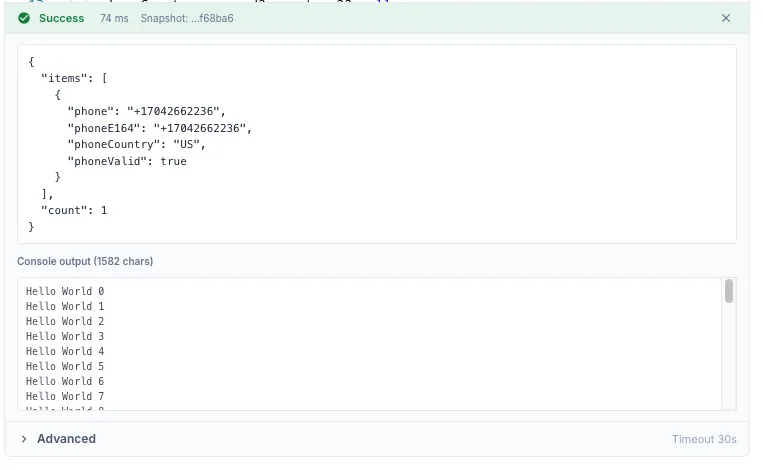
Console output is capped at 1 MB. For larger results, return a concise summary and inspect it in the execution trace.
Return value
Section titled “Return value”Whatever you return becomes the step’s output. The shape is flexible:
| You return | Downstream sees |
|---|---|
return { foo: 'bar', count: 42 } | { foo: 'bar', count: 42 } — referenced as {{ my-code.foo }}, {{ my-code.count }} |
return [1, 2, 3] | { data: [1, 2, 3] } — referenced as {{ my-code.data }} |
return 'hello' | { data: 'hello' } — primitives are wrapped in data |
return null or no return at all | {} — empty object |
For predictable downstream access, return an object with named fields. The auto-wrap for primitives and arrays is a safety net; explicit objects are clearer.
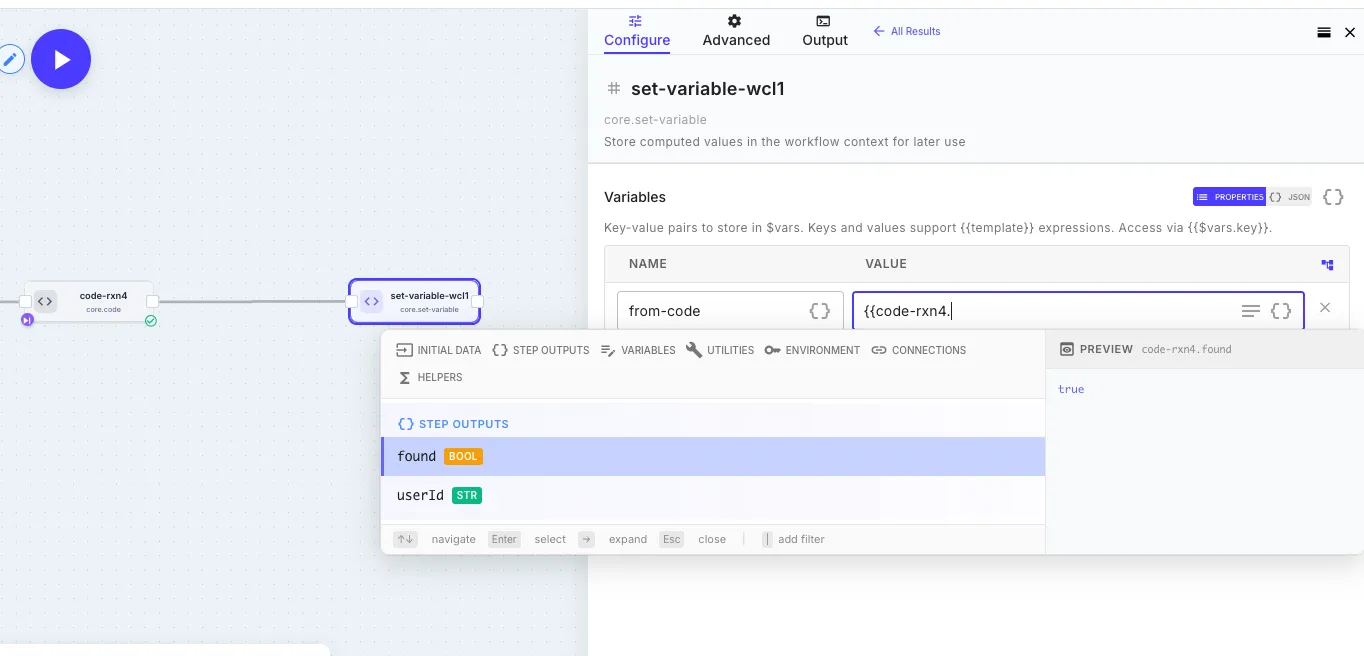
The screenshot above shows the round trip: a code step that returned { found: true, userId: '...' } exposes those exact field names to downstream steps. The Set Variable step’s autocomplete picks them up automatically — including their inferred types (bool, str) — and the preview pane on the right resolves the reference to its actual value. No type stubs to write, no schema to maintain.
Returning an operational error
Section titled “Returning an operational error”By default, the way to fail a Code step is to throw:
if (!$env.STRIPE_SECRET) { throw new Error('STRIPE_SECRET environment variable is not set')}A throw stops the workflow like any other failed step. Turn on Continue on Error only when the later steps can still produce a useful result. See Error Handling.
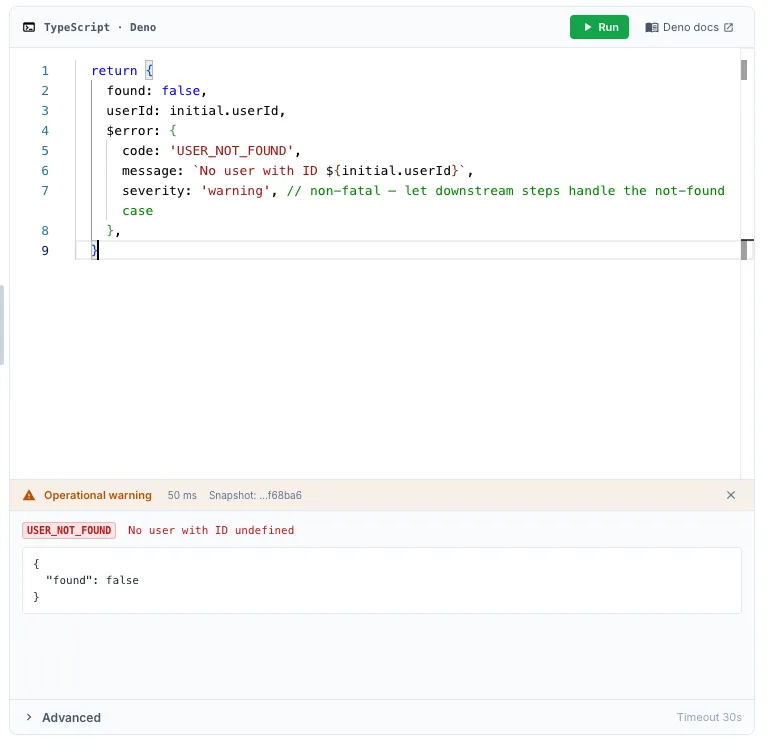
There are also two opt-in error keys you can include in your return value. The rest of the return object is preserved and inspectable downstream — just like an HTTP step’s 4xx response leaves the body readable.
$error marks the step as failed. The workflow stops unless Continue on Error is enabled:
const result = await fetchSomething()
if (result.status >= 400) {  return {    statusCode: result.status,    body: result.body,    $error: 'Upstream returned ' + result.status,  }}
return { ok: true, data: result.body }
$warning records a warning and lets the workflow continue:
return { partialData: rows.slice(0, 50), $warning: { code: 'PARTIAL_SYNC', message: 'Only the first 50 rows were processed', },}Both keys accept a string or { code, message }. If both are present, $error takes precedence.
The key is stripped from the visible output before downstream steps see it. The error or warning remains available in the step metadata and the global $errors array.
Retrying specific $error codes
Section titled “Retrying specific $error codes”A returned $error is permanent by default. To retry a specific case, give it a code and add that code to Retryable Error Codes in the step’s error settings:
try { const result = await callPartnerApi(input) return { result }} catch (err) { if (err.status === 429) { // Temporary: use a code that the step is configured to retry return { $error: { code: 'RATE_LIMITED', message: 'Partner rate limit hit' } } } // Permanent: stop here unless Continue on Error is enabled return { $error: { code: 'PARTNER_ERROR', message: err.message } }}With RATE_LIMITED listed as a retryable code, QuickFlo retries that result up to the configured limit. PARTNER_ERROR remains permanent. See Customize retries when the default is wrong.