
HTTP Step
The HTTP step makes requests to external APIs. The step editor has a familiar HTTP Client interface with tabs for Params, Headers, Body, and Advanced.
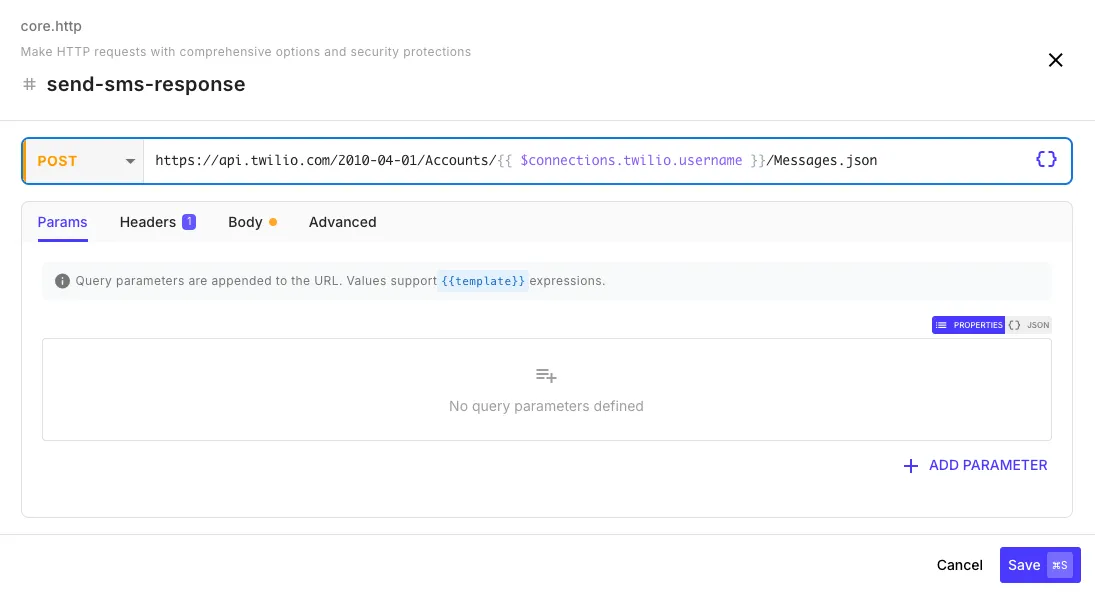
Request Fields
Section titled “Request Fields”| Field | Description | Example |
|---|---|---|
| URL | The endpoint to call. Supports templates. | https://api.example.com/users/{{ initial.userId }} |
| Method | HTTP method dropdown | GET, POST, PUT, PATCH, DELETE, HEAD, OPTIONS |
| Connection | Optional — pick a connection to handle auth automatically. See Using Connections for Auth below. | oauth-google, salesforce, twilio, etc. |
Params tab — Add query parameters as key-value pairs. These are merged with any parameters already in the URL.
Headers tab — Add request headers as key-value pairs:
| Header | Value |
|---|---|
Authorization | Bearer {{ $env.API_TOKEN }} |
X-Custom-Header | {{ initial.tenantId }} |
Body Tab
Section titled “Body Tab”Select a body type from the dropdown:
JSON — A JSON editor for structured request bodies. Content-Type is set automatically.
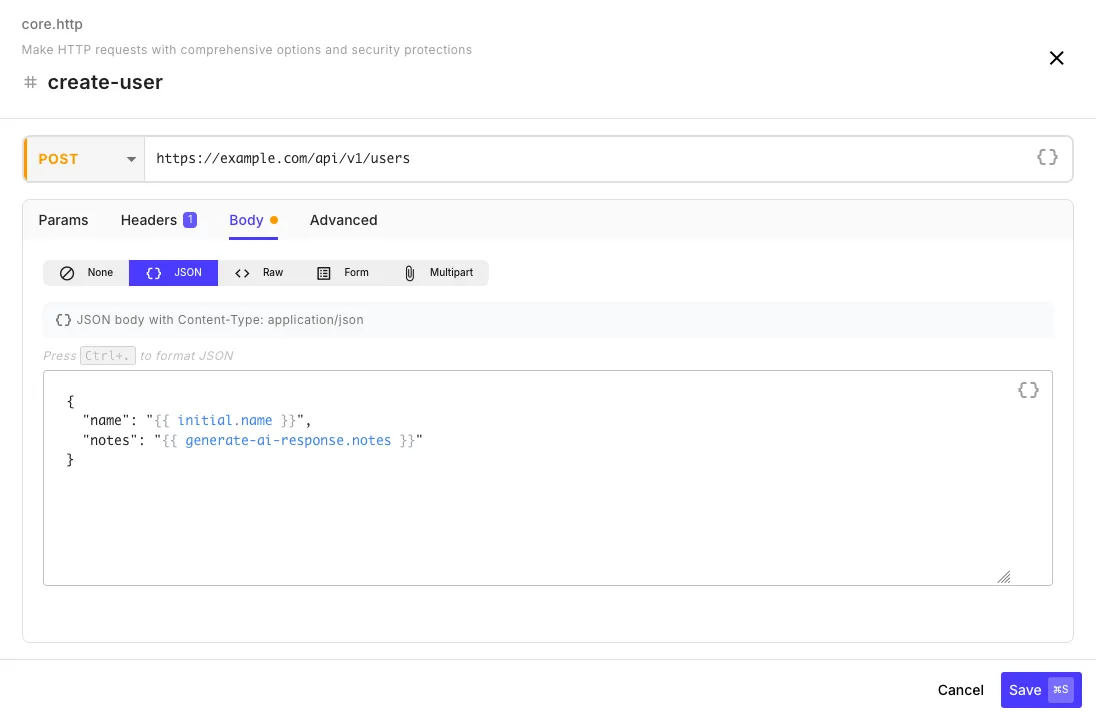
| Key | Value |
|---|---|
customerId | {{ initial.customerId }} |
action | sync |
Form — URL-encoded key-value pairs (application/x-www-form-urlencoded):
| Key | Value |
|---|---|
grant_type | client_credentials |
client_id | {{ $env.CLIENT_ID }} |
Raw — A text editor for XML, plain text, or any custom format. Set the Content-Type header manually in the Headers tab.
Multipart — For file uploads. Add fields with a name, value, and optional filename/content type.
Advanced Tab
Section titled “Advanced Tab”| Field | Default | Description |
|---|---|---|
| Timeout | 30 seconds | Max wait time (up to 30 minutes) |
| Follow Redirects | on | Automatically follow 3xx redirects |
| Max Redirects | 10 | Maximum redirect hops |
| Retry Attempts | 2 | Number of times to retry on transient failures (0–10). See Retries below for what counts as transient. |
Retries
Section titled “Retries”The HTTP step retries transient failures automatically with exponential backoff. The Advanced tab exposes a single Retry Attempts field — set it to control how many times the step will retry before giving up. Everything else about the retry behavior (which methods, which status codes, which network errors) is handled by smart defaults you don’t have to configure.
What gets retried automatically:
- Safe HTTP methods — QuickFlo can retry requests that are safe to repeat. Requests that may create or change data are handled more cautiously. Review the policy before retrying a write.
- HTTP status codes —
408 Request Timeout,413 Payload Too Large,429 Too Many Requests,500 Internal Server Error,502 Bad Gateway,503 Service Unavailable,504 Gateway Timeout, and Cloudflare’s521 Web Server Down/522 Connection Timed Out/524 A Timeout Occurred. - Network error codes —
ETIMEDOUT,ECONNRESET,EADDRINUSE,ECONNREFUSED,EPIPE,ENOTFOUND,ENETUNREACH,EAI_AGAIN. - 4xx client errors (other than the ones listed above) — never retried. A 400 or 404 usually means a real problem with the request itself, not a transient blip.
Set Retry Attempts to 0 to disable retries entirely — useful when the endpoint isn’t idempotent and even a GET retry could cause issues (e.g., charging a credit card with GET for some reason).
Customizing retry behavior
Section titled “Customizing retry behavior”For anything beyond Retry Attempts, use the step’s Error Handling panel. Start with Smart; use a narrower policy only when you can explain why. See Customize retries when the default is wrong.
Security Restrictions
Section titled “Security Restrictions”Response Output
Section titled “Response Output”After the step runs, reference the response in later steps:
{{ my-http-step.status }} // HTTP status code (200, 404, etc.){{ my-http-step.statusText }} // HTTP status text ("OK", "Not Found", etc.){{ my-http-step.ok }} // true if 2xx status{{ my-http-step.body }} // Parsed response (JSON/XML auto-detected){{ my-http-step.body.users }} // Access nested fields from JSON response{{ my-http-step.text }} // Raw response text{{ my-http-step.headers }} // Response headers{{ my-http-step.url }} // Final URL (after any redirects){{ my-http-step.redirected }} // true if any redirects were followed{{ my-http-step.retryCount }} // How many retry attempts were made{{ my-http-step.timings.phases.total }} // Total request time in ms{{ my-http-step.raw.request }} // The outgoing request (method, url, headers, body) for debuggingResponse bodies are automatically parsed as JSON or XML based on content type. If parsing fails, the raw text is returned in body.
Response Size Limit
Section titled “Response Size Limit”Response bodies stream in with a running byte counter and are capped to protect workflow memory. The effective cap is the workflow’s remaining memory budget. A response that crosses the cap fails the step immediately, mid-download, with an error naming the host, the limit, and the step: response from api.example.com exceeded 250.0MB limit at step fetch-data. When the server declares an oversized Content-Length up front, the step fails before downloading anything.
Timings
Section titled “Timings”The timings.phases object breaks the request into per-phase millisecond measurements — useful for diagnosing slow upstreams:
| Phase | What it measures |
|---|---|
wait | Time spent in the agent queue before the connection started |
dns | DNS lookup |
tcp | TCP handshake |
tls | TLS handshake (HTTPS only) |
request | Time spent sending the request |
firstByte | Time-to-first-byte from the server |
download | Time spent downloading the response body |
total | End-to-end total |
Using Connections for Auth
Section titled “Using Connections for Auth”The HTTP step has a Connection field at the top of the request fields. Pick a connection from the dropdown and QuickFlo injects the right Authorization header for you — including automatic OAuth token refresh on 401/403, after which the step retries the request once with the fresh token.
Supported Connection Types
Section titled “Supported Connection Types”| Connection type | Header injected |
|---|---|
| Any OAuth connection (Google, Slack, Salesforce, Custom OAuth, etc.) | Authorization: Bearer <accessToken> (token-type-aware) — refreshed automatically on 401/403 |
| Basic Auth | Authorization: Basic base64(username:password) |
| Twilio | Treated as Basic Auth using AccountSid:AuthToken |
| API Key | Whatever header name and prefix the connection is configured with — defaults to Authorization: <apiKey> |
Any other connection with an accessToken field | Authorization: Bearer <accessToken> (no auto-refresh — Custom OAuth is the path for refreshable tokens) |
Pick the connection in the Connection dropdown on the request field row. You don’t need to add anything to the Headers tab — auth is applied automatically.
Manual Header Templating (Fallback)
Section titled “Manual Header Templating (Fallback)”If you’d rather not use a connection, or you need to do something the connection injection doesn’t support (e.g., signature-based auth), you can still template credentials directly into headers:
| Header | Value |
|---|---|
Authorization | Bearer {{ $env.API_TOKEN }} |
Authorization | {{ $connections.my-api.apiKey }} |
X-Hmac-Signature | {{ initial.body | hmac: $env.HMAC_SECRET }} |
This pattern is also useful for HMAC-signed APIs (Twilio request signature, AWS Signature V4) where the auth header is computed per request rather than fixed.