
Working with Data
QuickFlo provides a set of data transformation steps for processing arrays of items — filtering rows, mapping fields, aggregating values, sorting, grouping, and joining datasets. These steps work like a data pipeline where each step transforms the output of the previous one.
Row-Level Variables
Section titled “Row-Level Variables”Data steps that iterate over items expose these context variables, which you can use in template expressions and conditions:
| Variable | Description |
|---|---|
$item | The current item object |
$this | Alias for $item (useful for primitive arrays) |
$index | Zero-based iteration index |
$isFirst | true for the first item |
$isLast | true for the last item |
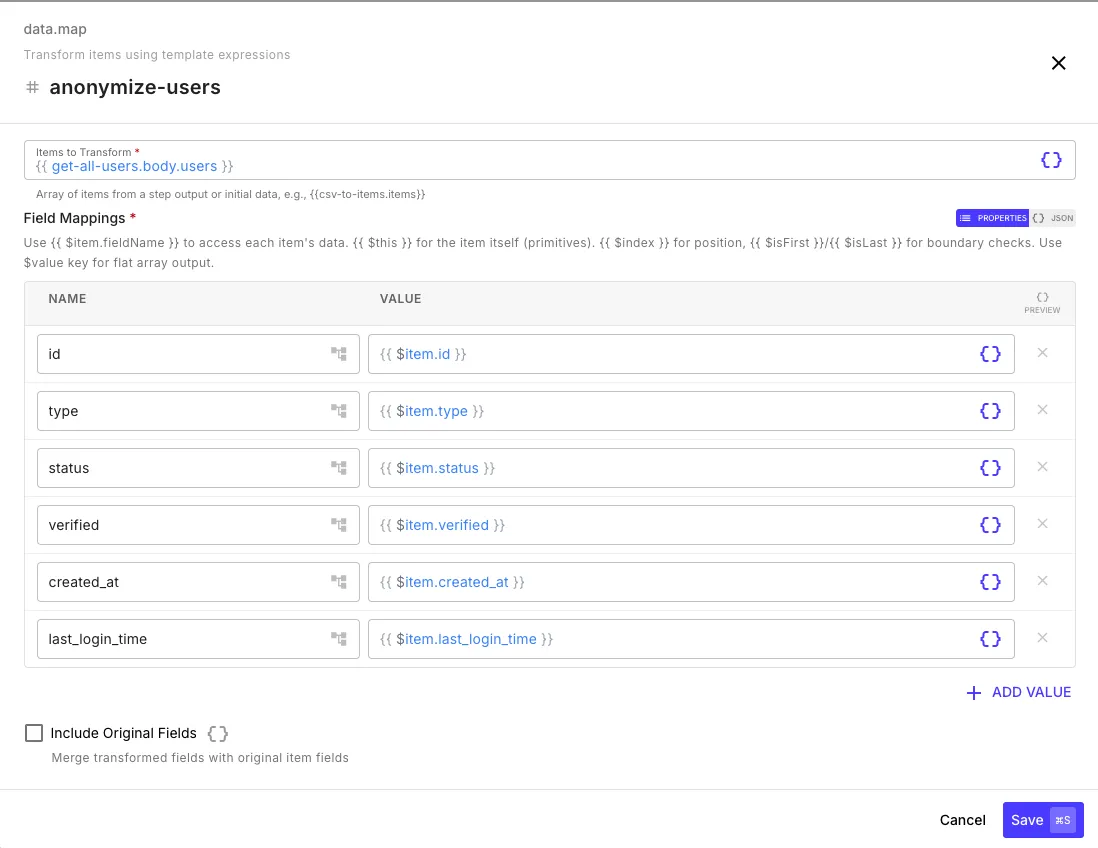
The map step (data.map) transforms each item in an array using template expressions.
| Field | Description |
|---|---|
items | Array of items to transform |
map | Object defining field mappings with template expressions |
includeOriginal | If true, merge transformed fields into the original item |
Examples
Section titled “Examples”Rename and compute fields:
| Output Field | Expression |
|---|---|
fullName | {{ $item.firstName }} {{ $item.lastName }} |
isAdult | {{ $item.age | gte: 18 }} |
email | {{ $item.email | downcase }} |
Extract a single value per item (flatten to primitives):
| Output Field | Expression |
|---|---|
$value | {{ $item.id }} |
Output: [1, 2, 3, ...] — an array of IDs instead of objects. Use $value as the field name to unwrap items into primitives.
Add a row number:
| Output Field | Expression |
|---|---|
rowNum | {{ $index | plus: 1 }} |
name | {{ $item.name }} |
Keep original fields and add computed ones:
Set includeOriginal to true and only define the new fields:
| Output Field | Expression |
|---|---|
displayName | {{ $item.firstName }} {{ $item.lastName }} |
All original fields are preserved and displayName is added.
Output
Section titled “Output”{{ transform-users.items }} // transformed array{{ transform-users.count }} // number of items{{ transform-users.errors }} // any per-field errorsFilter
Section titled “Filter”The filter step (data.filter) keeps items from an array that match a set of conditions.
| Field | Description |
|---|---|
items | Array of items to filter |
filter | Conditions that items must match to be kept |
Condition Builder
Section titled “Condition Builder”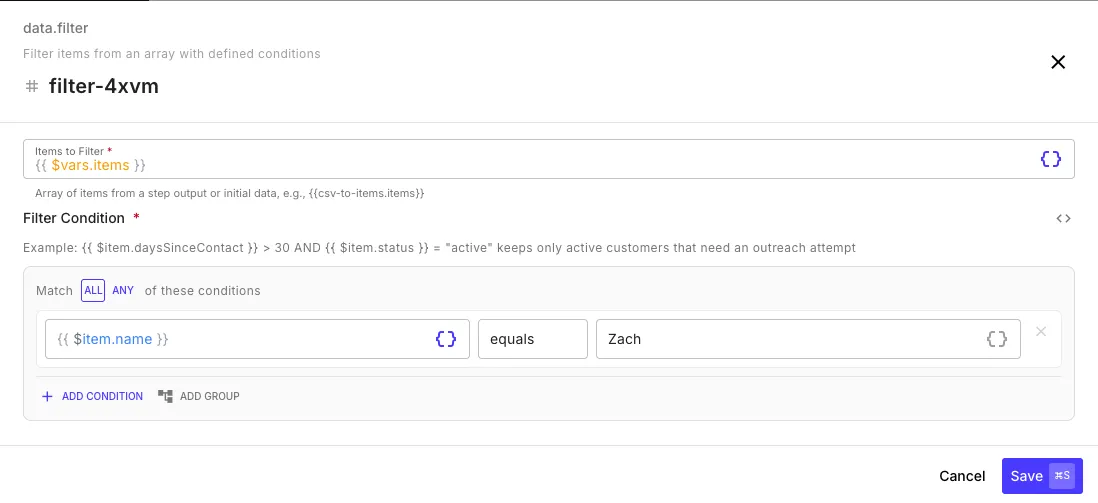
Conditions are built using the visual condition builder. Each condition has three parts:
- Left value — typically a template expression like
{{ $item.status }} - Operator —
equals,not equals,greater than,less than,contains, etc. - Right value — the value to compare against (literal or template expression)
You can combine multiple conditions with ALL (every condition must match) or ANY (at least one must match), and nest condition groups for complex logic.
Examples
Section titled “Examples”Keep active users:
Match ALL of these conditions:
{{ $item.status }}equalsactive
Keep adults with recent activity:
Match ALL of these conditions:
{{ $item.age }}greater than18{{ $item.lastLoginDays }}greater than0{{ $item.isDeleted }}equalsfalse
Keep items from specific regions:
Match ANY of these conditions:
{{ $item.region }}equalsUS{{ $item.region }}equalsCA{{ $item.region }}equalsUK
Output
Section titled “Output”{{ filter-active.items }} // items that matched{{ filter-active.count }} // number of matched items{{ filter-active.filteredCount }} // number of items removedReduce
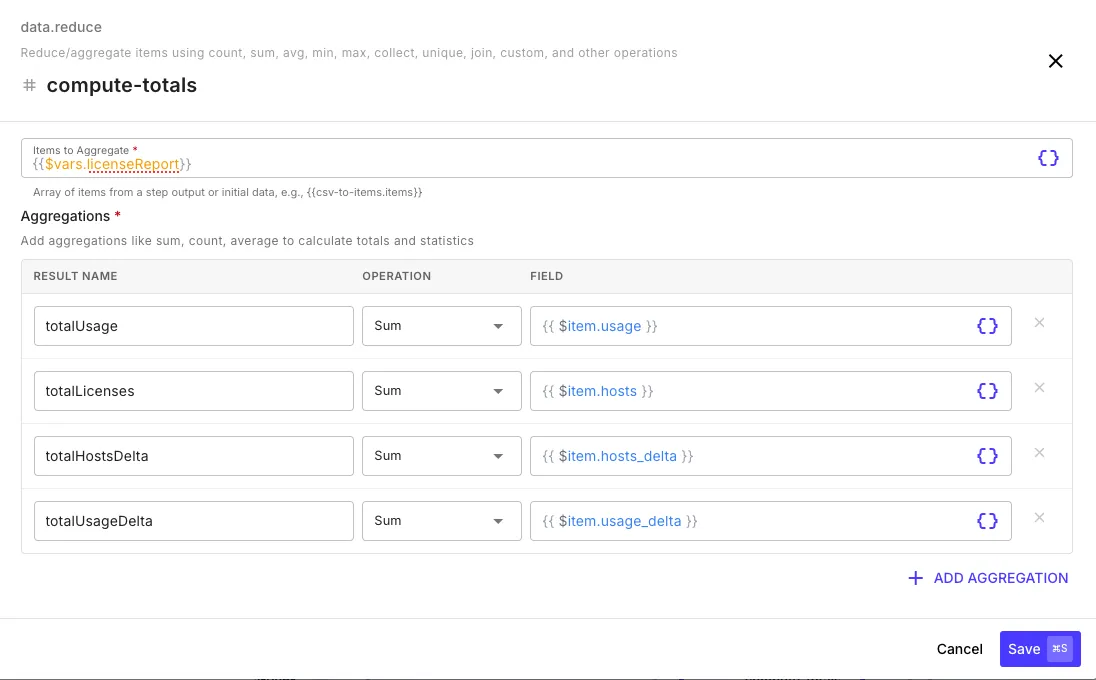
Section titled “Reduce”The reduce step (data.reduce) aggregates an array into summary values — like SQL aggregate functions.
| Field | Description |
|---|---|
items | Array of items to aggregate |
reduce | Named aggregation operations |
Aggregation Operations
Section titled “Aggregation Operations”| Operation | Description | Field |
|---|---|---|
count | Count items (optionally with a condition) | — |
sum | Sum a numeric field | $item.amount |
avg | Average a numeric field | $item.score |
min | Minimum value | $item.price |
max | Maximum value | $item.price |
collect | Gather values into an array | $item.email |
unique | Unique values | $item.status |
countUnique | Count distinct values | $item.userId |
join | Join values with separator | $item.name (separator: , ) |
first | First value | $item.email |
last | Last value | $item.status |
Each aggregation is given a name (the result key) and configured with an operation and a field to operate on.
Examples
Section titled “Examples”Multiple aggregations at once:
| Result Name | Operation | Field | Condition |
|---|---|---|---|
totalRevenue | sum | $item.amount | — |
avgOrderValue | avg | $item.amount | — |
orderCount | count | — | — |
uniqueCustomers | countUnique | $item.customerId | — |
highValueCount | count | — | $item.amount greater than 1000 |
Conditional aggregation:
Aggregations like count and sum can include an optional condition to only include items that match.
Output
Section titled “Output”{{ summarize-orders.results.totalRevenue }}{{ summarize-orders.results.avgOrderValue }}{{ summarize-orders.results.uniqueCustomers }}{{ summarize-orders.totalItems }}The sort step (data.sort) orders items by one or more fields with type-aware comparison.
| Field | Description |
|---|---|
items | Array to sort |
sort | Sort criteria (field, direction, type) |
nullHandling | Where to place null values: first or last |
Each sort criterion has:
| Field | Description |
|---|---|
field | Field name to sort by |
direction | asc or desc |
type | string, number, date, or auto |
Example
Section titled “Example”Sort by creation date (newest first), then by name alphabetically:
| Field | Direction | Type |
|---|---|---|
createdAt | desc | date |
name | asc | string |
Output
Section titled “Output”{{ sort-users.items }} // sorted array{{ sort-users.count }}Group By
Section titled “Group By”The group by step (data.group-by) groups items by field value(s) with optional aggregations — like SQL GROUP BY.
| Field | Description |
|---|---|
items | Array to group |
groupBy | Field name(s) to group by |
aggregations | Same aggregation operations as the Reduce step |
includeItems | If true, include the raw items array in each group |
Example
Section titled “Example”Group sales data by region with aggregations:
Group by: region
| Aggregation Name | Operation | Field |
|---|---|---|
totalSales | sum | $item.amount |
avgDealSize | avg | $item.amount |
reps | collect | $item.repName |
Output
Section titled “Output”{{ group-by-region.groups }} // array of group objects{{ group-by-region.totalGroups }} // number of groups{{ group-by-region.totalItems }} // total items processedEach group contains:
{ "key": "US", "count": 42, "aggregations": { "totalSales": 125000, "avgDealSize": 2976.19, "reps": ["Alice", "Bob", "Carol"] }}You can group by multiple fields (e.g., region and productLine), in which case each group’s key becomes an array like ["US", "Enterprise"].
The split step (data.split) divides an array into chunks or partitions.
Chunk Mode
Section titled “Chunk Mode”Split into fixed-size batches — useful for processing large datasets in manageable pieces:
| Field | Value |
|---|---|
items | {{ fetch-all.data }} |
mode | chunk |
chunkSize | 100 |
Output:
{{ split-batches.chunks }} // array of arrays{{ split-batches.totalChunks }}{{ split-batches.totalItems }}Partition Mode
Section titled “Partition Mode”Split into two groups based on a condition — items that match and items that don’t:
| Field | Value |
|---|---|
items | {{ fetch-contacts.data }} |
mode | partition |
condition | {{ $item.status }} equals active |
Output:
{{ partition-contacts.matching }} // items where condition is true{{ partition-contacts.notMatching }} // items where condition is false{{ partition-contacts.matchingCount }}{{ partition-contacts.notMatchingCount }}Select
Section titled “Select”The select step (data.select) keeps only specified fields from each item — like SQL SELECT.
| Field | Value |
|---|---|
items | {{ fetch-users.data }} |
select | name, email, role |
Output:
{{ select-fields.items }} // items with only the selected fields{{ select-fields.count }}{{ select-fields.fields }} // ["name", "email", "role"]The join step (data.join) combines two arrays on matching key fields — like a SQL JOIN.
Join Types
Section titled “Join Types”| Type | Description |
|---|---|
inner | Only items that match in both arrays |
left | All from left array, matching from right |
right | All from right array, matching from left |
full | All items from both arrays |
Example
Section titled “Example”Join orders with customers on customerId = id, prefixing customer fields with customer_ to avoid name collisions:
| Field | Value |
|---|---|
left | {{ fetch-orders.data }} |
right | {{ fetch-customers.data }} |
leftKey | customerId |
rightKey | id |
joinType | left |
rightPrefix | customer_ |
The dedup step (data.dedup) removes duplicate records from an array based on one or more key fields. Simpler than data.merge — no field consolidation, just deduplication.
| Field | Description |
|---|---|
items | Array of records to deduplicate |
key | One or more field names that define uniqueness — records with identical values across all key fields are considered duplicates |
keep | first (keep the earliest occurrence in input order) or last (keep the most recent). Defaults to first. |
Use a single key (email) for simple cases or composite keys (firstName + lastName + phone) for fuzzy matching where uniqueness spans multiple fields.
Output
Section titled “Output”{{ dedup-leads.items }} // unique records{{ dedup-leads.count }} // number of output records{{ dedup-leads.inputCount }} // number of input records{{ dedup-leads.removedCount }} // number of duplicates removedThe merge step (data.merge) is dedup with field consolidation — pick a winner per group, then collect or combine values from the losing records into the winner.
| Field | Description |
|---|---|
items | Array of records to merge |
groupBy | Key field(s) that define duplicate groups |
winnerBy | { field, direction } — pick the winning record per group by sorting on this field (e.g., lastUpdatedAt desc) |
consolidateFields | Optional: list of { outputField, sourceFields, strategy } to roll up values from across the group. Strategies: collectUnique, first, last, concat. |
distributeInto | Optional: take a collected array and spread it into named fields (e.g., phones → number1, number2, number3) |
includeGroupCount | If true, adds _mergeCount to each output record |
This is the right step when “dedup” actually means “fold N records into 1, but don’t lose data” — like merging duplicate contact records while keeping every unique phone and email across the group.
Output
Section titled “Output”{{ merge-contacts.items }} // one record per unique group{{ merge-contacts.count }} // number of output records{{ merge-contacts.inputCount }} // number of input records{{ merge-contacts.mergedGroups }} // groups that had more than one recordThe scrub step (data.scrub) removes or clears records whose field values appear in a reference list. Anti-join semantics — useful for DNC scrubs, suppression lists, and any “remove the matches” pattern.
| Field | Description |
|---|---|
items | The array to scrub |
against | The reference array of items to match against (e.g., DNC list) |
fields | Field names on items to check |
againstField | A single field name or array of field names on the reference list to match against |
action | remove (drop the entire item if any field matches) or clear (blank out only the matching field, keep the item) |
Output
Section titled “Output”{{ dnc-scrub.items }} // scrubbed array{{ dnc-scrub.count }} // number of items in the result{{ dnc-scrub.removedCount }} // items removed (action=remove) or fields cleared (action=clear)Enrich
Section titled “Enrich”The enrich step (data.enrich) adds fields from a reference dataset by matching on a key — like a VLOOKUP or a left join with field copy.
| Field | Description |
|---|---|
items | The array to enrich |
from | The reference dataset to copy fields from |
matchField | Field name on items to match on |
fromMatchField | Field name on from items to match on |
copyFields | Field names from the reference dataset to copy onto matching items |
prefix | Optional prefix for copied field names to avoid collisions (e.g., customer_) |
Output
Section titled “Output”{{ enrich-orders.items }} // items with new fields added{{ enrich-orders.count }} // number of items in the result{{ enrich-orders.matchedCount }} // how many had a matching reference recordExplode
Section titled “Explode”The explode step (data.explode) takes an array of items where multiple columns hold values of the same type (e.g., number1, number2, number3 all hold phone numbers) and produces one output row per value. Inverse of pivot/spread — enables cross-record operations on values that are spread across columns.
| Field | Description |
|---|---|
items | Array of items to explode |
columns | Field names to explode into separate rows |
valueField | Name of the new field on each output row that holds the exploded value (e.g., phone) |
dropEmpty | If true (default), skip empty/null/undefined values |
includeSourceField | If true (default), add a _sourceField column on each row indicating which original column the value came from |
After exploding, you can data.scrub, data.filter, data.dedup, or data.group-by on the unified value field — then use data.implode to reverse the operation.
Output
Section titled “Output”{{ explode-phones.items }} // one row per non-empty value{{ explode-phones.count }} // number of output rows{{ explode-phones.inputCount }} // number of input itemsImplode
Section titled “Implode”The implode step (data.implode) is the inverse of explode — it collapses exploded rows back into one row per group, distributing values across target columns. Use it as the last step in an explode → transform → implode pipeline.
| Field | Description |
|---|---|
items | The exploded rows to recombine (typically the output of data.explode followed by data.scrub or data.filter) |
groupBy | Field(s) that identify which rows belong to the same original record. Composite keys are supported. Usually _sourceIndex from a preceding data.explode. |
valueField | Name of the field on each exploded row that holds the value to pivot back into a column |
targetColumns | Output column names to distribute values into, in order. Values beyond the column count are dropped (or counted via overflowField). |
preserveStrategy | Which row in each group to source non-pivoted fields from — first (default) or last |
excludeFromPreserve | Field names to drop from the output (defaults to the bookkeeping fields added by explode: _sourceField, _sourceIndex) |
overflowField | Optional output field name that records the count of values that exceeded targetColumns capacity |
sortValuesBy / sortDirection | Optional — sort exploded rows within each group before distributing (e.g., “most recent first” by lastDispoDateTime) |
Output
Section titled “Output”{{ implode-phones.items }} // one record per group{{ implode-phones.count }} // number of output records{{ implode-phones.inputCount }} // number of exploded input rows{{ implode-phones.overflowCount }} // total values dropped due to target column capacityPattern: Explode → Scrub → Implode
Section titled “Pattern: Explode → Scrub → Implode”The classic “burst, clean, recombine” pipeline. Take a contacts list with three phone columns, scrub each phone against a DNC list, then put the surviving phones back into the same three columns:
Step 1 (data.explode): items=contacts, columns=[number1,number2,number3], valueField=phone → produces { name, phone, _sourceIndex, _sourceField }Step 2 (data.scrub): items=explode-step.items, against=dnc-list, fields=[phone], action=remove → drops rows whose phone is on the DNC listStep 3 (data.implode): items=scrub-step.items, groupBy=[_sourceIndex], valueField=phone, targetColumns=[number1,number2,number3] → reconstructs one row per original contact with surviving phonesAfter this pipeline, contacts that had all phones scrubbed disappear entirely; contacts that had some phones scrubbed keep their non-phone fields and have the surviving phones packed into the leftmost target columns.
Other Data Steps
Section titled “Other Data Steps”These additional data.* steps cover format conversions, key remapping, classification, diffs, and base64 encoding. Each is configured through the same form-based editor — pick the operation, point it at your data, and reference the output by step ID.
| Step | What it does |
|---|---|
data.flatten | Flatten a nested array field one or more levels deep |
data.map-keys | Rename object keys via a mapping (with optional drop of unmapped keys) |
data.classify | Tag items into named groups based on JSONLogic rules; supports multi-group tagging via tagField |
data.diff | Compare two arrays by key field(s) and report added, removed, and changed records |
data.csv-to-items | Parse a CSV (literal, file URL, or upload) into an items array |
data.transform-csv | CSV-in / CSV-out transform when you don’t need a typed items array in between |
data.items-to-csv | Render an items array back into a CSV string |
data.encode-base64 | Base64-encode a string |
data.decode-base64 | Base64-decode a string |
Chaining Data Steps
Section titled “Chaining Data Steps”Data steps are most powerful when chained together. Each step’s output feeds into the next:
fetch-data → filter-active → map-fields → sort-by-date → split-batches → for-each → processExample pipeline:
- Filter to keep only active records
- Map to transform field names and compute values
- Sort by date descending
- Split into batches of 100
- For-each over batches to process in parallel
// Step 1: filter{{ filter-active.items }}        // filtered array
// Step 2: map (takes filter output){{ map-fields.items }}           // transformed array
// Step 3: sort{{ sort-results.items }}         // sorted array
// Step 4: split into batches{{ split-batches.chunks }}       // array of 100-item arrays{{ split-batches.totalChunks }}  // number of batches