
Five9 Global Dial Attempt Counter
Five9 tracks dial attempts per list, per campaign — but not globally, per contact, across every list they sit in. If the same phone number lives in five lists and three campaigns, you have no single field to read that tells you “we’ve dialed this person 12 times.” This recipe fixes that: on every call, it updates a contact-level field (e.g. dial_attempts) with an incremented count, scoped by whatever keys you choose (Salesforce ID, Account ID, email, or a composite).
Workflow JSON
Section titled “Workflow JSON”{ "name": "five9-global-dial-attempts-counter", "description": "Five9 doesn't have a built in global dial attempts counter. This solves that problem by allowing an update back into Five9 on the specified contact, incrementing the dial attempt counter.", "steps": [ { "input": { "key_names": "{{ initial.key_fields | split: ',' }}", "key_values": "{{ initial.key_values | split: ',' }}", "counter_after": "{{ initial.counter_value | toInt | plus: 1 | toString }}", "counter_field": "{{ initial.counter_field }}", "counter_before": "{{ initial.counter_value }}" }, "stepId": "parse-inputs", "stepType": "core.set-variable" }, { "input": { "record": "{{ $vars.key_names | zip: $vars.key_values, $vars.counter_field, $vars.counter_after }}", "keys": "{{ $vars.key_names }}" }, "stepId": "build-record", "stepType": "core.set-variable" }, { "input": { "records": "{{ $util.emptyArray | push: $vars.record }}", "connection": "{{ $connections.five9 }}", "waitForResult": true, "contactUpdateConfig": { "crmUpdateSettings": { "crmAddMode": "DONT_ADD", "crmUpdateMode": "UPDATE_ALL", "allowDataCleanup": false, "failOnFieldParseError": false }, "dynamicFieldMapping": { "keys": "{{ $vars.keys }}" } } }, "stepId": "contact-update", "stepType": "five9.contact-update", "continueOnError": true }, { "input": { "audit_key": "{{ initial.key_values }}_{{ $util.timestamp }}", "audit_entry": { "number": "{{ initial.number }}", "success": "{{ contact-update.$meta.success }}", "timestamp": "{{ $util.now }}", "key_fields": "{{ initial.key_fields }}", "key_values": "{{ initial.key_values }}", "counter_after": "{{ $vars.counter_after }}", "counter_field": "{{ initial.counter_field }}", "error_message": "{{ contact-update.five9Error.message | default: contact-update.$meta.error.message | default: '' }}", "counter_before": "{{ initial.counter_value }}" } }, "stepId": "build-audit-entry", "stepType": "core.set-variable" }, { "input": { "key": "{{ $vars.audit_key }}", "value": "{{ $vars.audit_entry }}", "tableName": "global_contact_counter_audit", "expiration": { "enabled": true, "ttlSeconds": 2592000 } }, "stepId": "write-audit-log", "stepType": "data-store.set" } ], "initial": { "number": "7042662236", "key_fields": "salesforce_id", "key_values": "abc123", "counter_field": "dial_attempts", "counter_value": "0" }, "options": { "stopOnError": true, "executionMode": "auto", "timeoutMilliseconds": 300000 }, "version": "1.0.0", "inputSchema": { "type": "object", "properties": { "number": { "type": "string" }, "key_fields": { "type": "string" }, "key_values": { "type": "string" }, "counter_field": { "type": "string" }, "counter_value": { "type": "string" } } }}Connections needed:
| Connection | Why |
|---|---|
| Five9 | The five9.contact-update step writes the incremented counter back into every matching contact |
Trigger: a Webhook trigger fired at call end. Point your telephony platform’s “call completed” webhook at this workflow and pass the contact’s current counter value in the body. If you’re on Five9’s Supervisor events, use a Five9 Supervisor trigger instead and pull the fields from the event payload.
| Field | Value |
|---|---|
| Name | increment-dial-attempts |
| Method | POST |
| Authentication | On — generate a secret |
The expected webhook body:
{ "number": "7042662236", "key_fields": "salesforce_id", "key_values": "abc123", "counter_field": "dial_attempts", "counter_value": "0"}key_fields and key_values are comma-separated so you can match contacts on a composite key — e.g. "salesforce_id,account_id" + "abc123,acc_789". counter_value is the current value read upstream; the workflow increments it and writes counter_value + 1 back.
Wire up the Five9 connector
Section titled “Wire up the Five9 connector”On the Five9 side, create a Connector that fires this workflow every time a call is dispositioned. In Five9’s supervisor app → Connectors → Add Connector, configure it like this:
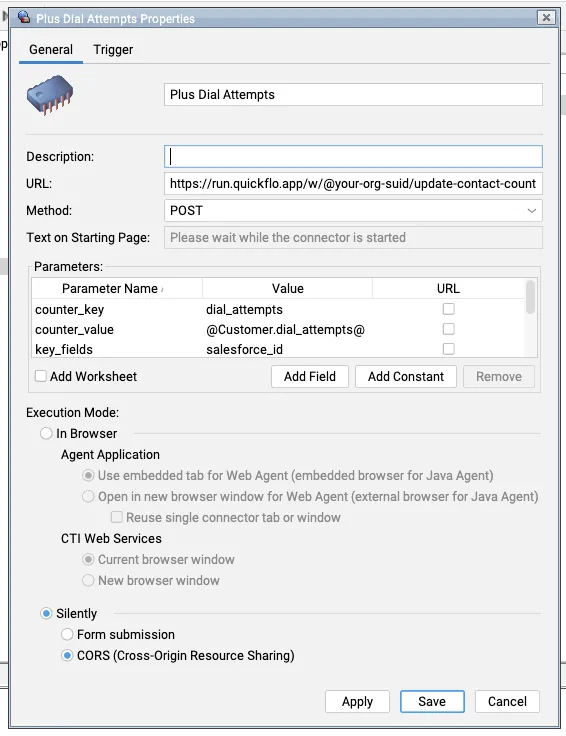
| Field | Value |
|---|---|
| Name | Plus Dial Attempts (or anything descriptive) |
| URL | https://run.quickflo.app/w/@your-org/increment-dial-attempts |
| Method | POST |
| Execution Mode | Silently → CORS (Cross-Origin Resource Sharing) |
Then under Parameters, add these — the URL checkbox controls whether each one is passed as a query string parameter (checked) or in the POST body (unchecked):
| Parameter Name | Value | URL? | Purpose |
|---|---|---|---|
counter_field | dial_attempts | ☐ | Which Customer attribute to increment. Must match a contact field that exists in your Five9 CRM. |
counter_value | @Customer.dial_attempts@ | ☐ | The contact’s current counter value — Five9 substitutes this live at dial time. The workflow adds 1 and writes it back. |
key_fields | salesforce_id | ☐ | Which Customer attribute Five9 should match on when updating. Comma-separate (salesforce_id,account_id) for composite keys. |
key_values | @Customer.salesforce_id@ | ☐ | The contact’s current value for the key field(s). Comma-separate in the same order as key_fields for composites. |
number | @Call.number@ | ☐ | Included in the audit log only — not used for matching. |
token | whs_… (your webhook secret) | ☑ | Passed as a URL query string so Five9’s CORS mode can authenticate without a body auth scheme. |
Trigger: On Call Dispositioned
Section titled “Trigger: On Call Dispositioned”Switch to the Trigger tab and pick On Call Dispositioned, then select only the dispositions that should count as a dial attempt — usually anything in the “attempted contact” bucket (No Answer, Busy, Left Voicemail, Connected, etc.) and not disposition-less outcomes like “Abandoned in Queue” or “Agent Error.” The dispositions you pick here define what “dial attempt” means in your data, so choose the set carefully.
Attach the connector to your campaigns
Section titled “Attach the connector to your campaigns”Five9 connectors don’t fire globally — they have to be explicitly attached to each campaign that should use them. In the campaign properties, open the Connectors tab and add the Plus Dial Attempts connector to every campaign whose calls you want counted. Any campaign where the connector isn’t attached will still dial the contact, but its attempts won’t roll into the global counter — a silent gap that’s easy to miss.
How it works
Section titled “How it works”parse-inputs(core.set-variable) — splits the CSV-stylekey_fieldsandkey_valuesinto arrays, computescounter_after = counter_value + 1, and stashes everything in$varsfor later steps.build-record(core.set-variable) — the core of the recipe. Uses thezipfilter to pair the two parallel arrays into{ salesforce_id: "abc123", ... }, then appendscounter_field → counter_afteras one extra KV pair:{{ $vars.key_names | zip: $vars.key_values, $vars.counter_field, $vars.counter_after }}. The same expression builds$vars.keysfor Five9’sdynamicFieldMapping.contact-update(five9.contact-update) — pushes the record into Five9, telling it which fields are the lookup keys ($vars.keys) and which fields to update (everything else, including the incremented counter).continueOnError: trueso a Five9 failure doesn’t lose the audit entry.build-audit-entry(core.set-variable) — assembles an audit object capturing the before/after counter values, the Five9 result, and any error message.write-audit-log(data-store.set) — writes the audit entry to aglobal_contact_counter_auditdata store table, keyed bykey_values + timestamp. A 30-day TTL keeps the table from growing unbounded.
What to customize first
Section titled “What to customize first”- Match on a composite key. Pass
"salesforce_id,account_id"askey_fieldsand"abc123,acc_789"askey_valueswhen a single Salesforce ID isn’t unique enough or you don’t have a crm id to match as a primary key — thezipfilter handles the extra columns with no code changes. - Aggregate in a dashboard. The
global_contact_counter_audittable is ready-made for a dashboard — pivot bykey_fields × successto see which identity fields are producing Five9 update failures, or plotcounter_afterover time to watch dial velocity per contact. - Adjust the audit retention. The default
ttlSeconds: 2592000is 30 days. Bump it for longer forensic windows, or drop thedata-store.setstep entirely if you don’t need an audit trail.
Related recipes
Section titled “Related recipes”- AI Post-Call Summary — same “fire on call-end” trigger shape, different downstream action (LLM summary instead of a counter bump)