Skip to content

Template Syntax

QuickFlo uses LiquidJS as its template engine. Templates let you reference step outputs, environment variables, connections, and utility values anywhere in your workflow step configuration.

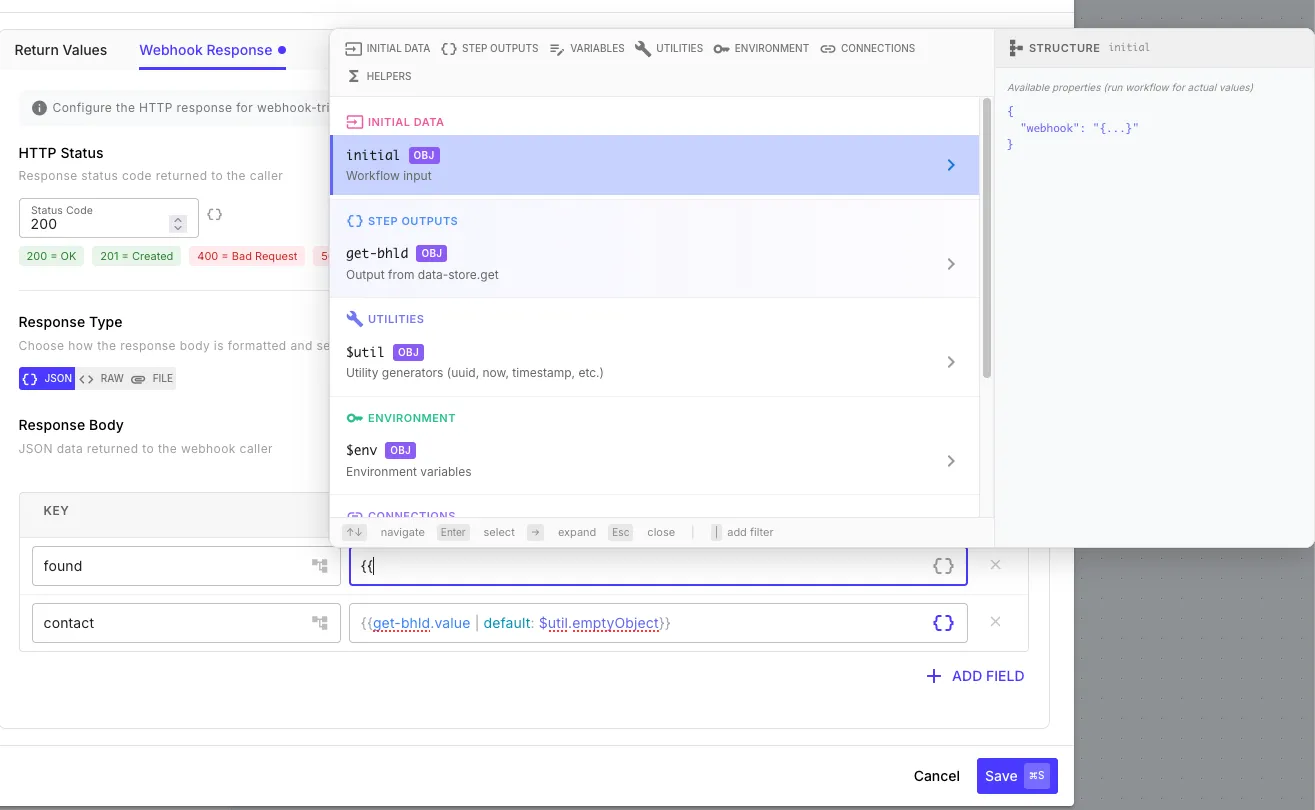
Template autocomplete showing available variables and step outputs

Step outputs are referenced by their step ID directly — not nested under a steps prefix:

{{ my-step-id.someOutputField }}

For example, if you have a step with ID fetch-users that returns a list of users:

{{ fetch-users.data }}
{{ fetch-users.data[0].name }}
{{ fetch-users.totalCount }}

Every step exposes a $meta object with execution metadata:

{{ fetch-users.$meta.success }} // boolean
{{ fetch-users.$meta.error }} // error message (if failed)
{{ fetch-users.$meta.skipped }} // boolean
{{ fetch-users.$meta.durationMilliseconds }} // execution time in ms
{{ fetch-users.$meta.stepType }} // step type name

These global variables are available in every template expression:

VariableDescription
{{ initial.* }}Data passed when the workflow execution started
{{ step-id.* }}Output from a completed step, referenced by its step ID
{{ $env.* }}Environment variables
{{ $connections.* }}Connection credential objects
{{ $vars.* }}Workflow variables set by set-variable steps
{{ $util.* }}Utility generators (UUIDs, timestamps, etc.)

The initial object contains the data that triggered the workflow execution. Its structure depends on the trigger type.

When a workflow is triggered via webhook, the request body fields are spread to the root of initial, and a webhook context object provides access to the full request:

{{ initial.someFieldFromBody }}
{{ initial.webhook.query.page }}
{{ initial.webhook.query.filter }}
{{ initial.webhook.headers['content-type'] }}
{{ initial.webhook.body }}
{{ initial.webhook.params }}

The webhook object contains:

FieldDescription
webhook.bodyRaw request body
webhook.queryURL query parameters (?key=value)
webhook.paramsURL path parameters
webhook.headersRequest headers (lowercase keys)
webhook.filesUploaded files (multipart/form-data) with base64 buffers

For JSON request bodies, all top-level fields are also accessible directly:

// POST body: { "userId": 123, "action": "sync" }
{{ initial.userId }} // 123
{{ initial.action }} // "sync"
{{ initial.webhook.query.debug }} // query param ?debug=true

Form submissions spread the submitted field values to the root and include a form context:

{{ initial.name }}
{{ initial.email }}
{{ initial.form.formName }}
{{ initial.form.submittedAt }}
{{ initial.form.authenticatedUser.username }}

The form object contains:

FieldDescription
form.triggerIdThe trigger ID
form.formNameName of the form
form.submittedAtISO 8601 timestamp of submission
form.authenticatedUserPresent if the form requires authentication
form.authenticatedUser.usernameThe authenticated user’s username
form.authenticatedUser.connectionNameThe form-auth connection used
form.authenticatedUser.metadataCustom metadata from the form-auth connection

Scheduled workflows receive the initialData configured in the trigger settings, spread directly to the root:

// initialData config: { "reportType": "daily", "emailTo": "admin@example.com" }
{{ initial.reportType }} // "daily"
{{ initial.emailTo }} // "admin@example.com"

Event payloads from connected services are spread directly to the root of initial. The structure depends on the event provider:

{{ initial.eventType }}
{{ initial.data.agentId }}
{{ initial.data.newState }}

When executing a workflow manually or via API, the provided initial data is spread to the root:

// API call: POST /workflow-templates/:id/execute { "initial": { "name": "John" } }
{{ initial.name }} // "John"

The set-variable step writes values into $vars. Each set-variable step merges its output into the existing $vars object, so values persist and accumulate across the workflow:

{{ $vars.customerName }}
{{ $vars.retryCount | default: 0 }}

Reference connection credential objects by their connection name:

{{ $connections.my-salesforce }}
{{ $connections.postgres.host }}

See Connections for setup guides.

Reference encrypted environment variables. Variables from the workflow’s default environment are available at the root level:

{{ $env.API_KEY }}
{{ $env.DATABASE_URL }}

Variables from other environments are scoped by environment name:

{{ $env.staging.API_KEY }}

See Environments for details on setup and connection redirection.

$util provides zero-input generators — each call produces a fresh value:

UtilityTypeDescription
$util.uuidstringRandom UUID v4
$util.nowstringCurrent ISO 8601 timestamp
$util.timestampnumberUnix timestamp (milliseconds)
$util.timestampSecondsnumberUnix timestamp (seconds)
$util.todaystringToday’s date (YYYY-MM-DD)
$util.fileTimestampstringFile-safe date/time (YYYY-MM-DD_HHmmss)
$util.randomnumberRandom integer 0–100
$util.randomFloatnumberRandom float 0–1
$util.passwordstringSecure random 16-character password
$util.randomHexstring32 random hex characters
$util.randomBase64string32 random bytes as base64
$util.emptyObjectobjectEmpty {}
$util.emptyArrayarrayEmpty []
$util.truebooleanBoolean true
$util.falsebooleanBoolean false
$util.nullnullNull value

Example:

{{ $util.uuid }}
// → "a1b2c3d4-e5f6-7890-abcd-ef1234567890"
{{ $util.now }}
// → "2026-02-18T14:30:00.000Z"

Filters transform values using the pipe (|) syntax:

{{ fetch-users.name | upcase }}
{{ fetch-users.items | size }}
{{ some-step.createdAt | date: "%Y-%m-%d" }}

QuickFlo supports all standard LiquidJS filters (string, math, array, date, etc.) plus the custom filters listed below.

FilterDescriptionExample
base64EncodeEncode string to Base64{{ "hello" | base64Encode }}aGVsbG8=
base64DecodeDecode Base64 string{{ "aGVsbG8=" | base64Decode }}hello
fromJsonParse JSON string to object{{ jsonString | fromJson }}
toJsonConvert value to JSON string{{ obj | toJson }}
FilterDescriptionExample
basicAuthBase64-encode username:password{{ "user" | basicAuth: "pass" }}
basicAuthHeaderFull Basic ... header value{{ "user" | basicAuthHeader: "pass" }}
basicAuthHeaderFromObjectBasic auth header from object with username/password fields{{ creds | basicAuthHeaderFromObject }}
FilterDescriptionExample
toStringConvert to string (objects become JSON){{ 123 | toString }}"123"
toNumberConvert to number (0 if invalid){{ "42" | toNumber }}42
toIntConvert to integer (truncates decimal){{ "12.9" | toInt }}12
toFloatConvert to float{{ "12.5" | toFloat }}12.5
toBooleanConvert to boolean ("true", "1", "yes" → true){{ "true" | toBoolean }}true
toArrayWrap value in array (parses JSON strings){{ "hello" | toArray }}["hello"]
FilterDescriptionExample
arrayCreate array from arguments{{ "" | array: 1, 2, 3 }}[1, 2, 3]
rangeCreate number range{{ 0 | range: 5 }}[0, 1, 2, 3, 4]
findFind first item where field equals value{{ users | find: "id", 42 }}
distinctByRemove duplicates by field{{ users | distinctBy: "email" }}
distinctByFieldsRemove duplicates by multiple fields{{ items | distinctByFields: "name", "email" }}
arrayConcatConcatenate arrays{{ arr1 | arrayConcat: arr2 }}
pushAdd item to end of array{{ items | push: "new" }}
FilterDescriptionExample
pickKeep only specified keys{{ user | pick: "name", "email" }}
omitRemove specified keys{{ user | omit: "password" }}
keysGet array of object keys{{ user | keys }}
valuesGet array of object values{{ user | values }}
objectMergeMerge objects together{{ defaults | objectMerge: overrides }}
FilterDescriptionExample
padStartPad string at start to target length{{ "5" | padStart: 3, "0" }}"005"
padEndPad string at end to target length{{ "hi" | padEnd: 5, "." }}"hi..."
substringExtract substring by index{{ "hello" | substring: 1, 4 }}"ell"
includesCheck if string contains substring{{ "hello" | includes: "ell" }}true
startsWithCheck if string starts with prefix{{ "hello" | startsWith: "he" }}true
endsWithCheck if string ends with suffix{{ "hello" | endsWith: "lo" }}true
strConcatConcatenate multiple values{{ "Hello" | strConcat: " ", "World" }}"Hello World"
FilterDescriptionExample
eqEqual{{ status | eq: "active" }}
neNot equal{{ status | ne: "deleted" }}
gtGreater than{{ age | gt: 18 }}
gteGreater than or equal{{ score | gte: 100 }}
ltLess than{{ price | lt: 50 }}
lteLess than or equal{{ count | lte: 10 }}
FilterDescriptionExample
coalesceFirst non-null value{{ value | coalesce: "fallback" }}
ternaryConditional value selection{{ isAdmin | ternary: "Admin", "User" }}
andLogical AND{{ hasAccess | and: isActive }}
orLogical OR{{ isAdmin | or: isManager }}
notLogical NOT{{ isDeleted | not }}
FilterDescriptionExample
minMinimum of values{{ 5 | min: 3, 8 }}3
maxMaximum of values{{ 5 | max: 3, 8 }}8
sumSum all numbers in array{{ amounts | sum }}
avgAverage of numbers in array{{ scores | avg }}
FilterDescriptionExample
nowCurrent ISO 8601 timestamp{{ "" | now }}
timestampCurrent Unix timestamp (ms){{ "" | timestamp }}
formatCurrentDateTimeFormat current time{{ "" | formatCurrentDateTime: "YYYY-MM-DD" }}
FilterDescriptionExample
hashCryptographic hash (sha256, sha512, md5){{ "data" | hash }} or {{ "data" | hash: "md5" }}
hmacHMAC signature{{ "message" | hmac: "secret" }}
passwordGenerate secure random password{{ "" | password }} or {{ "" | password: 24, false }}
randomHexRandom hex string{{ "" | randomHex }} → 32 hex characters
randomBase64Random base64 string{{ "" | randomBase64 }}

All telephony filters use libphonenumber-js for parsing and validation.

FilterDescriptionExample
toE164Convert to E.164 international format{{ "202-555-1234" | toE164: "US" }}+12025551234
e164ToNanpaConvert E.164 to NANPA national format{{ "+12025551234" | e164ToNanpa }}(202) 555-1234
isValidPhoneCheck if phone number is valid{{ "202-555-1234" | isValidPhone: "US" }}true
isValidE164Check if strictly valid E.164 format{{ "+12025551234" | isValidE164 }}true
formatPhoneFormat to NATIONAL, INTERNATIONAL, or E.164{{ "+12025551234" | formatPhone: "INTERNATIONAL" }}
phoneCountryGet ISO country code{{ "+12025551234" | phoneCountry }}US
phoneCallingCodeGet country calling code{{ "+12025551234" | phoneCallingCode }}1
phoneNationalNumberGet national number without country code{{ "+12025551234" | phoneNationalNumber }}2025551234

The toE164, isValidPhone, and formatPhone filters accept an optional default country code (e.g., "US") for parsing numbers without a country prefix.

When using data transformation steps like map, filter, or reduce, these variables are available within each iteration:

VariableDescription
{{ $item }}Current item being processed
{{ $original }}Original item before transformation
{{ $this }}Alias for $item (useful for primitives)
{{ $index }}Zero-based iteration index
{{ $isFirst }}true for the first item
{{ $isLast }}true for the last item

Example in a map step expression:

{{ $item.firstName }} {{ $item.lastName }} ({{ $index }})

Templates support LiquidJS control flow tags for conditional content:

{% if fetch-users.$meta.success %}
Found {{ fetch-users.data | size }} users
{% else %}
Step failed: {{ fetch-users.$meta.error }}
{% endif %}

See the LiquidJS tags documentation for if/elsif/else, unless, case/when, for loops, and more.

Use {% literal %} to preserve template syntax that should not be resolved — useful when passing templates to external APIs:

{% literal %}Hello {{name}}, your order {{orderId}} is ready{% endliteral %}

This outputs the raw string Hello {{name}}, your order {{orderId}} is ready without resolving the {{ }} expressions.

Templates support up to 5 levels of recursive resolution. This means a template can resolve to another template, which resolves again:

{{ $env.MY_CONNECTION }}

If $env.MY_CONNECTION contains the string {{$connections.production-db}}, the engine resolves it further to the actual connection object. This is the foundation of environment connection redirection.