
Webhook → Weather API
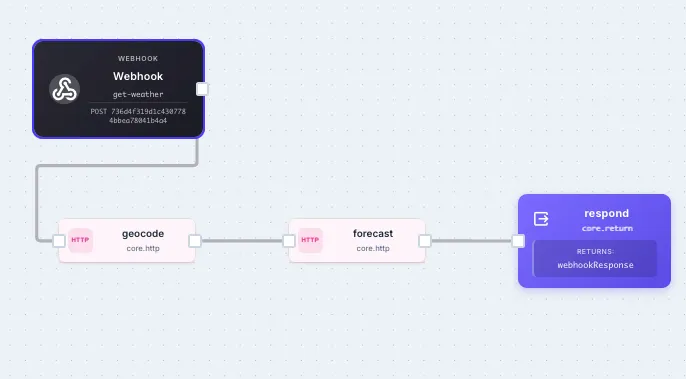
A webhook URL that takes { "city": "Austin" } and returns the current weather as clean JSON. Two HTTP calls, a return step, no auth, no setup. The recipe version of the Getting Started tutorial.
Workflow JSON
Section titled “Workflow JSON”Copy this and paste it into a new workflow with Cmd+V:
{ "name": "Weather Lookup API", "initial": { "city": "Austin" }, "steps": [ { "stepId": "geocode", "stepType": "core.http", "input": { "url": "https://geocoding-api.open-meteo.com/v1/search", "method": "GET", "searchParams": { "name": "{{ initial.city }}", "count": "1" } } }, { "stepId": "forecast", "stepType": "core.http", "input": { "url": "https://api.open-meteo.com/v1/forecast", "method": "GET", "searchParams": { "latitude": "{{ geocode.body.results[0].latitude }}", "longitude": "{{ geocode.body.results[0].longitude }}", "current": "temperature_2m,wind_speed_10m,weather_code", "temperature_unit": "fahrenheit", "wind_speed_unit": "mph" } } }, { "stepId": "respond", "stepType": "core.return", "input": { "webhookResponse": { "statusCode": 200, "body": { "city": "{{ initial.city }}", "country": "{{ geocode.body.results[0].country }}", "temperatureF": "{{ forecast.body.current.temperature_2m }}", "windMph": "{{ forecast.body.current.wind_speed_10m }}", "weatherCode": "{{ forecast.body.current.weather_code }}" } } } } ]}Connections needed: none — both APIs are public and unauthenticated.
Trigger: add a Webhook trigger to the workflow with:
| Field | Value |
|---|---|
| Name | weather-lookup (or whatever URL slug you want) |
| Method | POST |
| Authentication | Off (or enable and add a Bearer token if you want to gate the API) |
How it works
Section titled “How it works”Three steps run in sequence:
- Geocode — calls open-meteo’s free geocoding API to convert the city name to latitude and longitude.
- Forecast — calls open-meteo’s forecast API with those coordinates and asks for current temperature, wind, and weather code.
- Return — shapes the response into clean JSON for the webhook caller.
The whole thing runs in 200–400 ms. Sample response:
{ "city": "Austin", "country": "United States", "temperatureF": 72.3, "windMph": 8.4, "weatherCode": 0}Test it
Section titled “Test it”curl -X POST https://run.quickflo.app/w/@your-org/weather-lookup \ -H "Content-Type: application/json" \ -d '{"city": "Tokyo"}'What to customize first
Section titled “What to customize first”- Add error handling for unknown cities. open-meteo returns an empty
resultsarray if the city isn’t found. Add acore.ifstep before the forecast step that checks{{ geocode.body.results | size }}and returns a404early if the array is empty. - Add caching. Hit the same city twice in the same hour and you’re paying the latency cost twice. Wrap the forecast step in a data store get/set with a 1-hour TTL.
- Add an AI sentence. Pipe the forecast through an LLM Call step and have it generate a one-sentence “interesting fact about today’s weather in this city” — turns the response from data into a delight.
Related recipes
Section titled “Related recipes”- Webhook → AI URL Summary — same shape, but with an LLM Call step doing structured extraction
- Scheduled Slack Digest — uses data store queries instead of external APIs