
Error Handling
The two error channels
Section titled “The two error channels”When a step fails, it can fail in two structurally different ways.
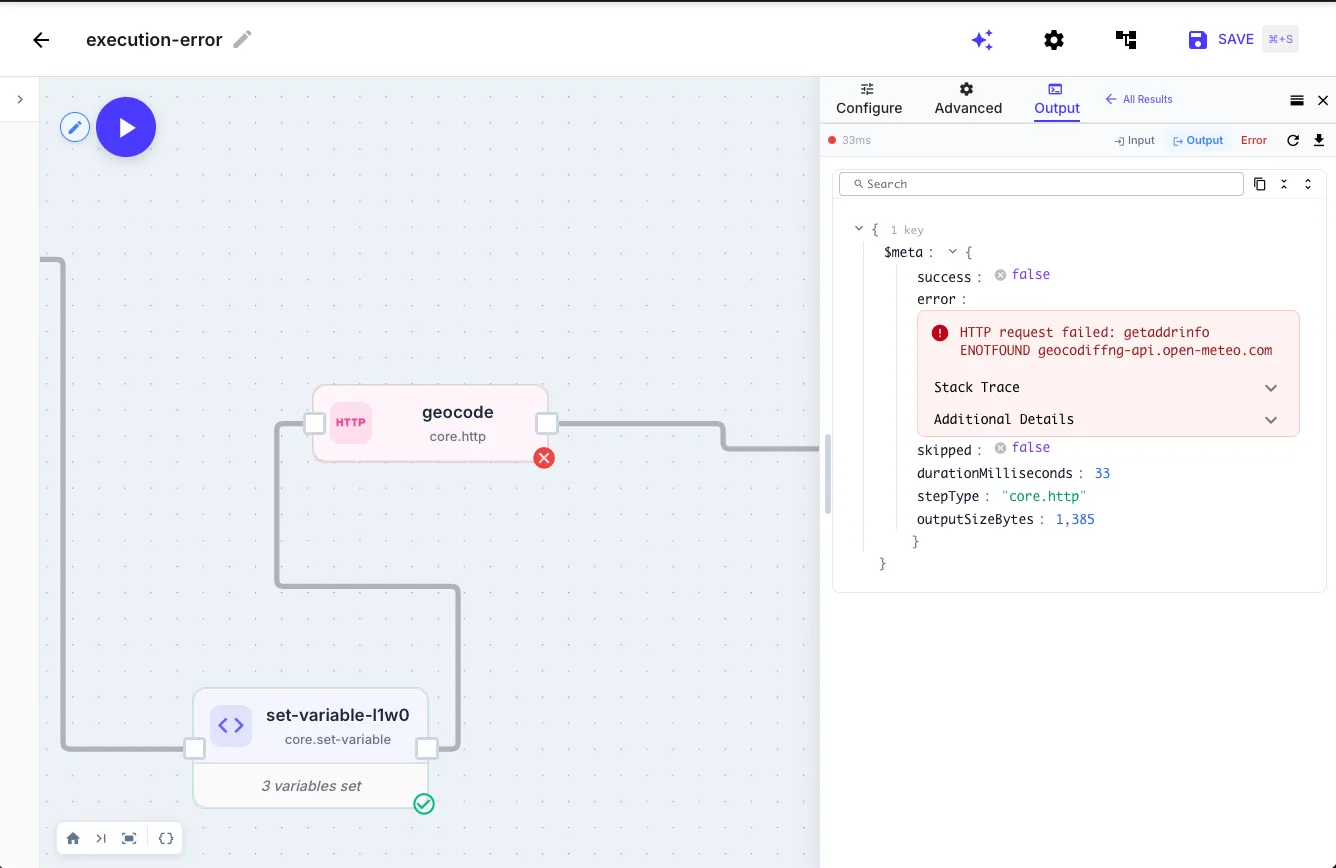
Execution errors
Section titled “Execution errors”The step threw an exception — network unreachable, script crashed, required field missing. The engine marks the step $meta.success = false and halts the workflow unless continueOnError is set. There’s no usable return value.
{{ fetch-customer.$meta.success }} // false{{ fetch-customer.$meta.error.message }} // "ETIMEDOUT: connect ETIMEDOUT 192.0.2.1:443"Operational errors
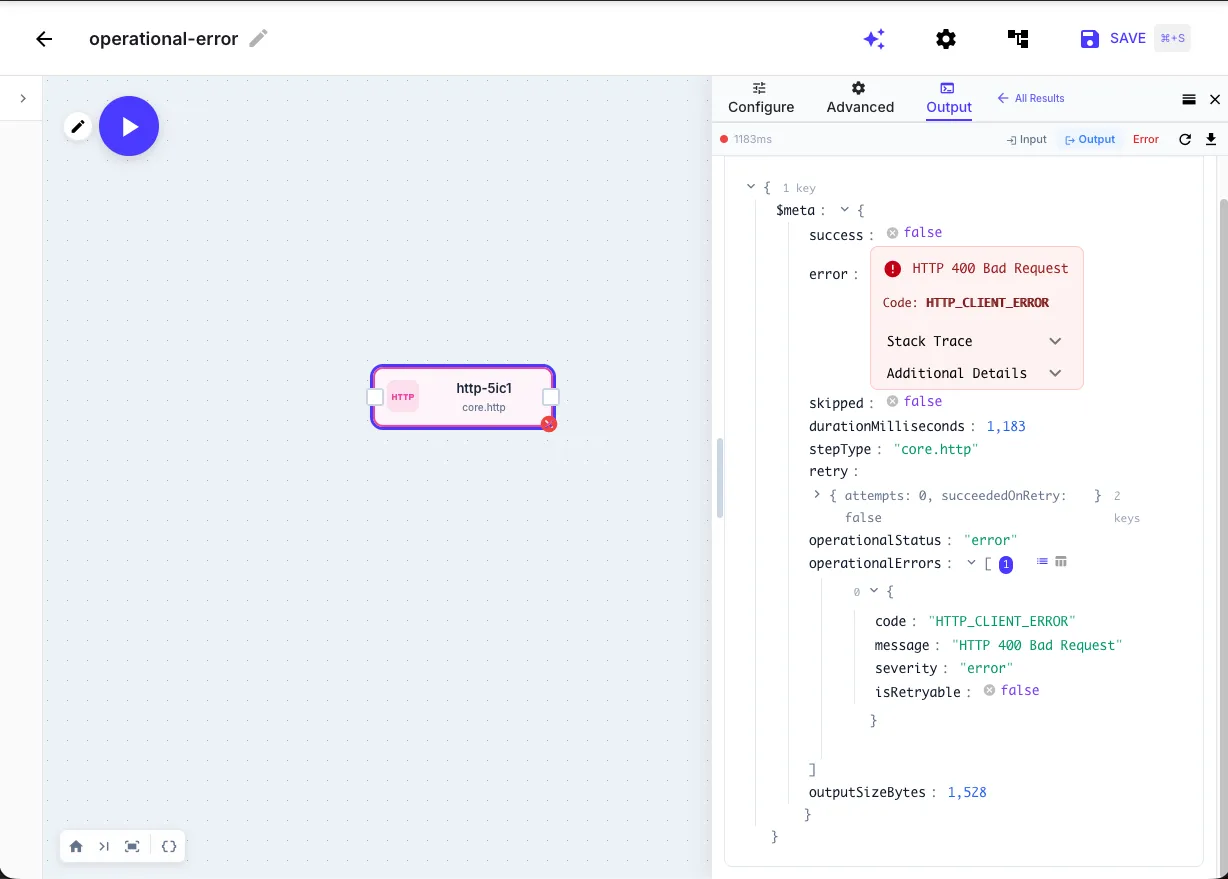
Section titled “Operational errors”The step ran successfully but the outcome indicates a problem — an HTTP 400, an SMTP rejection, an LLM content-policy violation. The step is marked as failed and the workflow halts (same as an execution error), but the output is still readable.
{{ fetch-customer.$meta.success }} // false{{ fetch-customer.$meta.operationalStatus }} // 'error'{{ fetch-customer.body.message }} // "Customer not found" — still readable{{ fetch-customer.status }} // 404 — still readableThe engine classifies each step’s output automatically based on step type. You don’t configure this — steps know what their own failures look like.
Telling them apart
Section titled “Telling them apart”| Question | Read this |
|---|---|
| Did the step succeed? | {{ step.$meta.success }} — false for both error types |
| Did it throw? | {{ step.$meta.error }} — present only for execution errors |
| Did it return a bad response? | {{ step.$meta.operationalStatus }} — 'error' or 'warning' for operational errors. Output is still readable. |
The two channels are visually distinct in the executions UI. A thrown error has no usable output — the step never produced one, so you see the error message only. An operational error preserves the full output, so you see both the error banner and the Input/Output tabs with the response body, headers, etc. still inspectable.
Severity: warning vs error
Section titled “Severity: warning vs error”Operational errors carry a severity:
| Severity | Behavior |
|---|---|
error (default) | Halts the workflow. Override with continueOnError. |
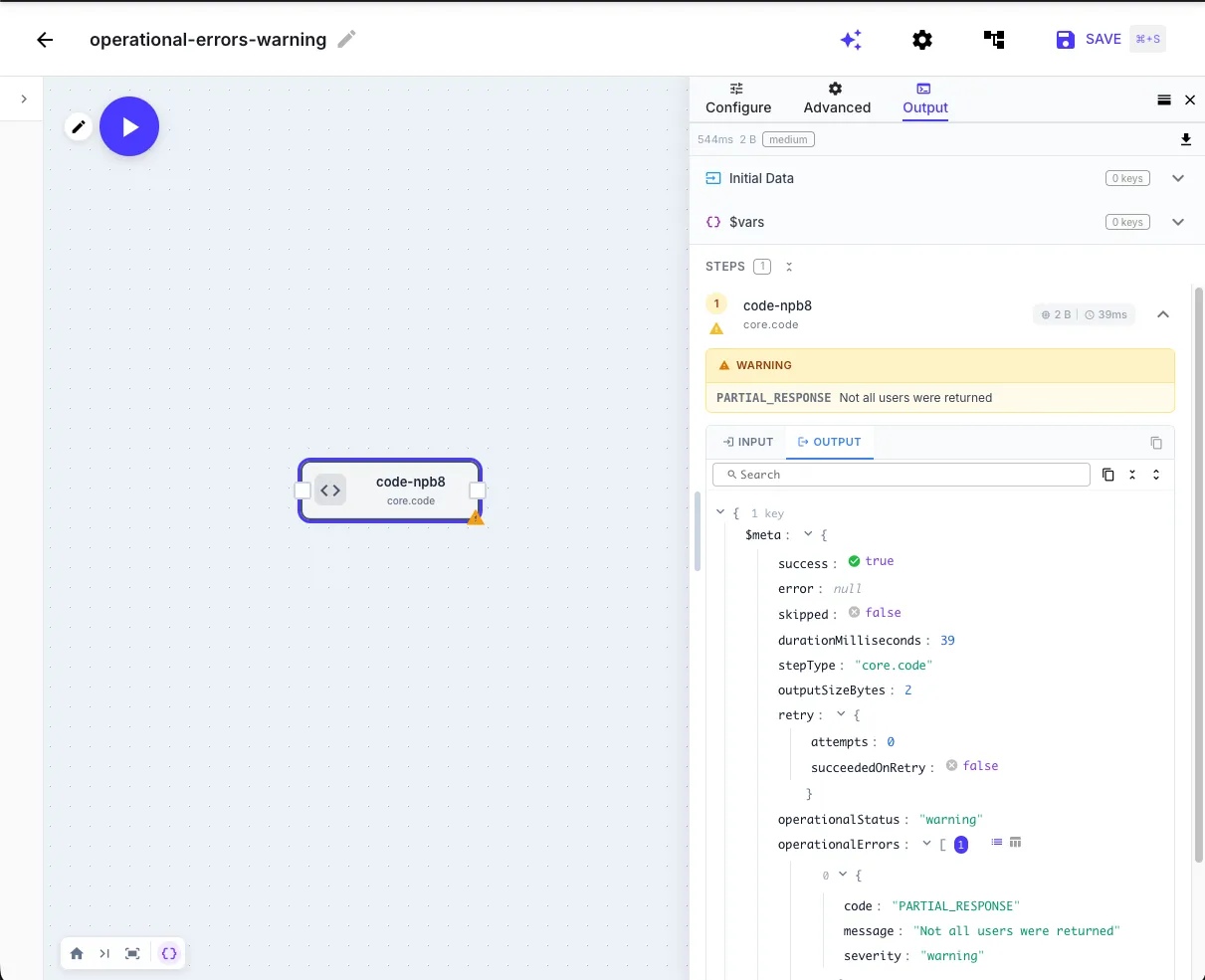
warning | Workflow continues automatically. Warning is logged and appended to $errors. |
A workflow that finishes with warnings (or absorbed errors via continueOnError) is marked Completed with Errors instead of Success.
Where warnings come from
Section titled “Where warnings come from”Most steps only emit error severity. Warnings are produced by:
| Step | When | Why |
|---|---|---|
| Code | Script returns { $warning: { code, message } } | User-controlled. Use for partial-success states. |
| SMTP rejected some recipients (partial delivery) | Succeeded for accepted recipients, but some failed. | |
| AI Agent | Reached timeout, max_iterations, or max_tokens | Returned a partial result — workflow should process it but know it was truncated. |
Emitting a warning from a Code step
Section titled “Emitting a warning from a Code step”Use the $warning key to report a non-fatal problem while keeping the step’s output inspectable:
const rows = await syncPagesToNotion($steps['load-pages'].items)const failed = rows.filter((r) => !r.ok)
if (failed.length > 0 && failed.length < rows.length) {  return {    synced: rows.length - failed.length,    failedRows: failed,    $warning: {      code: 'NOTION_PARTIAL_SYNC',      message: `${failed.length} of ${rows.length} rows failed`,    },  }}return { synced: rows.length, failedRows: [] }
Use $error instead of $warning when the failure should halt the workflow. See Code step → Error reporting.
Per-step error metadata: $meta
Section titled “Per-step error metadata: $meta”Every step exposes a $meta object with execution metadata:
{{ step.$meta.success }} // boolean{{ step.$meta.operationalStatus }} // 'ok' | 'warning' | 'error'{{ step.$meta.error }} // present when the step threw{{ step.$meta.operationalErrors }} // present when the step returned an errorBranching on failure → use {{ step.$meta.success }} in an if step. It’s false for both thrown and operational failures.
Reading the error message → prefer {{ step.$meta.operationalErrors[0].message }} for operational errors, {{ step.$meta.error.message }} for thrown errors.
$meta is for checking a specific step. For the running history of all errors, use $errors.
The $errors context variable
Section titled “The $errors context variable”$errors is a workflow-global array of every error and warning from the run. Each entry is flat — no nested arrays:
{ stepId: string // "fetch-customer" stepType: string // "core.http" type: 'operational' | 'execution' code: string // "HTTP_CLIENT_ERROR" message: string // human-readable severity: 'error' | 'warning' isRetryable?: boolean}Access from templates:
{{ $errors | size }} // total entries{{ $errors[0].message }} // first error's message{{ $errors[0].code }} // first error's machine code{{ $errors[0].stepId }} // which step produced itOr from a Code step:
const lastFailure = $errors[$errors.length - 1]if (lastFailure) { console.log('Last failure:', lastFailure.stepId, lastFailure.message)}$errors is most useful when steps continue past errors (via continueOnError) and downstream logic needs to react.
Error taxonomy codes
Section titled “Error taxonomy codes”Every step that talks to an external system classifies its errors into normalized QuickFlo codes — HTTP_CLIENT_ERROR, LLM_RATE_LIMIT, FILE_NOT_FOUND, etc. These are not the raw codes from the upstream provider; they’re a consistent namespace so the engine can make retry decisions and the UI can show human-readable labels regardless of which provider is behind the step.
The original provider error is always in the .message field.
Which step types have taxonomies
Section titled “Which step types have taxonomies”| Family | Taxonomy codes |
|---|---|
| HTTP | Node.js network codes + HTTP response statuses |
| Code | User-defined via $error: { code: '...' } or $warning: { code: '...' } |
| File | FILE_NOT_FOUND, FILE_ACCESS_DENIED, STORAGE_CONNECTION_FAILED, STORAGE_TIMEOUT, STORAGE_RATE_LIMITED, … |
| Data Store | DATA_STORE_CONNECTION_FAILED, DATA_STORE_TIMEOUT, DATA_STORE_DEADLOCK, DATA_STORE_TABLE_NOT_FOUND, … |
| AI / LLM | LLM_TIMEOUT, LLM_RATE_LIMIT, LLM_CONTENT_POLICY, LLM_INVALID_API_KEY, LLM_CONTEXT_TOO_LONG, … |
SMTP_CONNECTION_FAILED, SMTP_AUTH_FAILED, SMTP_INVALID_RECIPIENT, SMTP_RATE_LIMITED, … | |
| Five9 | FIVE9_RATE_LIMITED, FIVE9_AUTH_FAILED, FIVE9_NOT_FOUND, FIVE9_TIMEOUT, … |
| Audio | SUBPROCESS_TIMEOUT, SUBPROCESS_OUT_OF_MEMORY, SUBPROCESS_INVALID_INPUT, … |
Every code is visible inline in the Custom retry mode editor with its classification and description.
Step types not in this table (data.*, crypto.*, datetime.*) are pure-compute — failures are deterministic logic errors where retrying wouldn’t help.
continueOnError
Section titled “continueOnError”By default, both execution errors and error-severity operational errors halt the workflow. Set continueOnError: true to absorb the failure:
{ "stepId": "optional-enrichment", "stepType": "core.http", "continueOnError": true, "input": { "url": "https://api.example.com/extra-data/{{ initial.id }}" }}When set and the step fails: the step is marked failed, the error is appended to $errors, and downstream steps still run.
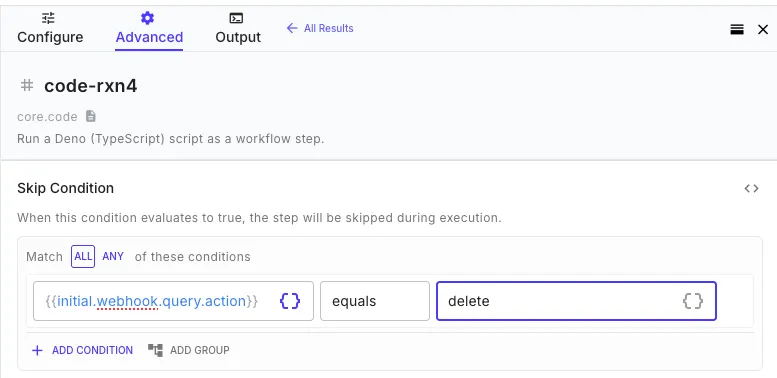
Skip conditions
Section titled “Skip conditions”Every step has a Skip Condition in its settings. The step is skipped at runtime when the condition is true. Skipped steps are marked $meta.skipped = true, $meta.success = true — they aren’t failures.
Common patterns:
{ "==": ["{{ fetch-data.$meta.success }}", false] }{ "==": ["{{ fetch-data.$meta.skipped }}", true] }Retry policies
Section titled “Retry policies”Steps retry transient failures automatically with smart defaults:
| Step type | Default retries | Base delay | Backoff |
|---|---|---|---|
| HTTP / OAuth API | 2 | 1s | 2× exponential |
| Code | 3 | 1s | 2× exponential |
| 1 | 2s | 2× exponential | |
| Five9 SOAP | 2 | 2s | 2× exponential |
| LLM / AI Agent | 1 | 3s | 2× exponential |
| File / Storage | 2 | 1s | 2× exponential |
| Data Store | 1 | 500ms | 2× exponential |
| Audio / Speech / PDF | 1–2 | 2s | 2× exponential |
Retry Behavior presets
Section titled “Retry Behavior presets”Every classified step exposes a Retry Behavior dropdown:
| Preset | Behavior |
|---|---|
| Smart (default) | Retries transients, halts on permanents, retries unknowns optimistically. |
| Aggressive | Retries everything except auth/invalid-config errors. |
| Rate limits only | Only retries *_RATE_LIMITED / HTTP 429. |
| Custom | Explicit denylist. Pre-populated with permanent codes. |
What gets retried
Section titled “What gets retried”*_RATE_LIMITED,*_TIMEOUT,*_CONNECTION_FAILED— always retried*_AUTH_FAILED,*_INVALID_*,*_NOT_FOUND— never retried- HTTP
POST/PATCH— not retried except for 429 (server rejected before doing work) - Code step
$error— not retried unless code is opted in via Custom mode *_UNKNOWN_ERROR— retried optimistically (same bias as Temporal)
Retries + continueOnError
Section titled “Retries + continueOnError”Retries happen before continueOnError. The step retries up to maxRetries times; if all fail, continueOnError decides whether to halt or absorb:
attempt 1 fails → wait → attempt 2 fails → wait → attempt 3 fails ↓ continueOnError set? ┌─────────┴─────────┐ yes no ↓ ↓ workflow continues workflow haltsCustomizing retry
Section titled “Customizing retry”Override defaults with retryPolicy on any step:
{ "stepId": "fetch-data", "stepType": "core.http", "retryPolicy": { "maxRetries": 5, "delayMs": 2000, "backoffMultiplier": 2, "mode": "aggressive" }}Set maxRetries: 0 to disable retries entirely.
Recipes
Section titled “Recipes”View JSON
[
  {
    "stepId": "primary-lookup",
    "stepType": "core.http",
    "continueOnError": true,
    "input": {
      "url": "https://api.example.com/customers/{{ initial.customerId }}",
      "method": "GET"
    }
  },
  {
    "stepId": "fallback-lookup",
    "stepType": "core.http",
    "skipCondition": {
      "==": [
        "{{ primary-lookup.$meta.success }}",
        true
      ]
    },
    "input": {
      "url": "https://backup-api.example.com/customers/{{ initial.customerId }}",
      "method": "GET"
    }
  }
]View JSON
[
  {
    "stepId": "process-items",
    "stepType": "core.for-each",
    "input": {
      "items": "{{ initial.items }}",
      "concurrency": 3,
      "continueOnError": true,
      "steps": [
        {
          "stepId": "fetch-item",
          "stepType": "core.http",
          "continueOnError": true,
          "input": {
            "url": "https://api.example.com/items/{{ $item.id }}",
            "method": "GET"
          }
        }
      ]
    }
  },
  {
    "stepId": "report-results",
    "stepType": "core.set-variable",
    "input": {
      "totalProcessed": "{{ process-items.count }}",
      "succeeded": "{{ process-items.succeeded }}",
      "failed": "{{ process-items.failed }}",
      "errorCount": "{{ $errors | size }}"
    }
  }
]View JSON
[
  {
    "stepId": "validate-input",
    "stepType": "core.code",
    "continueOnError": true,
    "input": {
      "script": "if (!input.email || !input.email.includes('@')) {\n  throw new Error('Missing or invalid email')\n}\nif (!input.amount || input.amount <= 0) {\n  throw new Error('Amount must be greater than zero')\n}\nreturn { valid: true }"
    }
  },
  {
    "stepId": "branch-on-validation",
    "stepType": "core.if",
    "input": {
      "condition": {
        "==": [
          "{{ validate-input.$meta.success }}",
          false
        ]
      },
      "then": [
        {
          "stepId": "respond-bad-request",
          "stepType": "core.return",
          "input": {
            "webhookResponse": {
              "statusCode": 400,
              "body": {
                "error": "{{ validate-input.$meta.error.message }}"
              }
            }
          }
        }
      ],
      "else": [
        {
          "stepId": "respond-ok",
          "stepType": "core.return",
          "input": {
            "webhookResponse": {
              "statusCode": 200,
              "body": {
                "ok": true
              }
            }
          }
        }
      ]
    }
  }
]View JSON
{
  "stepId": "charge-card",
  "stepType": "core.code",
  "retryPolicy": {
    "maxRetries": 0
  },
  "input": {
    "script": "// Non-idempotent: do NOT retry on failure.\n// Charging twice is far worse than failing once.\nconst res = await fetch('https://api.payments.example/charge', {\n  method: 'POST',\n  headers: {\n    'Authorization': `Bearer ${env.PAYMENTS_API_KEY}`,\n    'Content-Type': 'application/json'\n  },\n  body: JSON.stringify({\n    amount: input.amount,\n    customerId: input.customerId,\n    idempotencyKey: input.orderId\n  })\n})\n\nif (!res.ok) {\n  throw new Error(`Charge failed: ${await res.text()}`)\n}\n\nreturn await res.json()"
  }
}View JSON
{
  "stepId": "call-partner-api",
  "stepType": "core.code",
  "retryPolicy": {
    "mode": "custom",
    "maxRetries": 5,
    "delayMs": 2000,
    "backoffMultiplier": 2,
    "nonRetryableErrorCodes": [
      "INVALID_REQUEST",
      "PARTNER_REJECTED"
    ]
  },
  "input": {
    "script": "// Classify the failure so the engine can decide whether to retry.\n// Retryable codes (anything NOT in nonRetryableErrorCodes) → engine retries.\n// Non-retryable codes → engine halts immediately.\ntry {\n  const res = await fetch(`https://partner.example/api/lookup/${input.id}`)\n\n  if (res.status === 429) {\n    return { $error: { code: 'RATE_LIMITED', message: 'Partner rate limit hit' } }\n  }\n  if (res.status === 400) {\n    return { $error: { code: 'INVALID_REQUEST', message: 'Bad input — will not retry' } }\n  }\n  if (res.status >= 500) {\n    return { $error: { code: 'PARTNER_SERVER_ERROR', message: `Partner returned ${res.status}` } }\n  }\n  if (!res.ok) {\n    return { $error: { code: 'PARTNER_REJECTED', message: 'Partner rejected request' } }\n  }\n\n  return await res.json()\n} catch (err) {\n  return { $error: { code: 'NETWORK_ERROR', message: err.message } }\n}"
  }
}