Speech Steps
QuickFlo includes multi-provider speech steps for transcription (STT) and voice synthesis (TTS). Choose the best provider for your use case — all four share the same step interface, so switching providers doesn’t require rewiring your workflow.
Providers
Section titled “Providers”| Provider | STT | TTS | Diarization | Streaming |
|---|---|---|---|---|
| OpenAI | Whisper | TTS-1 / TTS-1-HD | No | No |
| ElevenLabs | Scribe v1 | Multilingual v2 + others | Yes | Yes |
| Google Cloud | Chirp 2, Telephony | Neural / Studio voices | Yes | Yes |
| AWS | Transcribe | Polly (Neural) | Yes | Yes |
Each provider requires its own connection — an API key for OpenAI/ElevenLabs, a GCP service account for Google Cloud, or AWS credentials for AWS.
Text to Speech
Section titled “Text to Speech”Generate audio from text using any of the four providers.
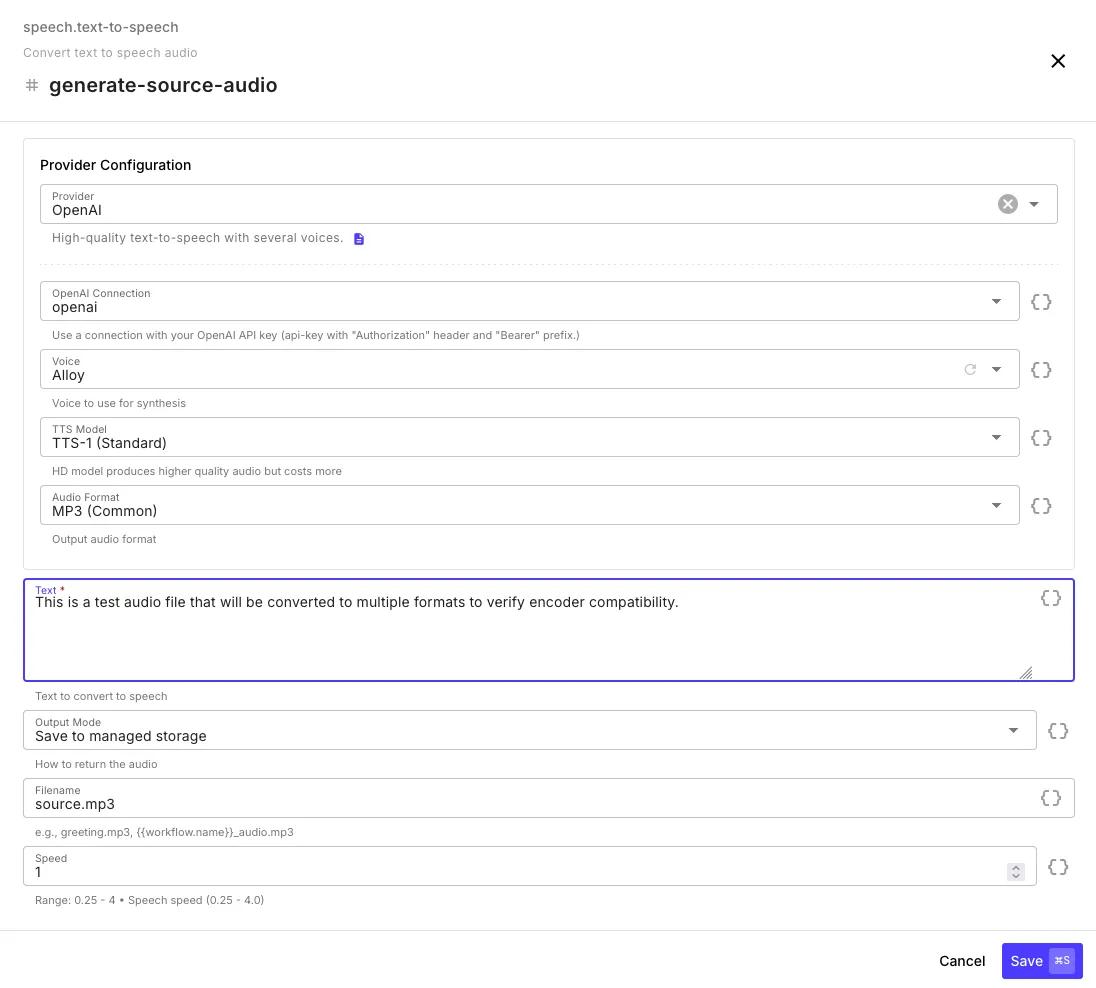
| Field | Description |
|---|---|
| Provider | OpenAI, ElevenLabs, Google Cloud, or AWS |
| Connection | API key or cloud credentials for the selected provider |
| Voice | Voice to use — the dropdown automatically populates with available voices once you select a connection |
| Model | Provider-specific model (e.g., TTS-1, TTS-1-HD for OpenAI) |
| Audio Format | Output format (MP3, WAV, OGG, PCM, etc. — varies by provider) |
| Text | The text to convert — supports template syntax |
| Output Mode | Save to managed storage (file) or return as base64 |
| Filename | Custom filename — supports templates |
| Speed | Speech speed from 0.25x to 4x (default: 1x) |
Output
Section titled “Output”{ "audio": { "url": "gs://your-org/audio/greeting_abc123.mp3", "filename": "greeting_abc123.mp3", "format": "mp3", "size": 48200 }, "provider": "openai", "voice": "alloy", "textLength": 142}Provider Notes
Section titled “Provider Notes”OpenAI — TTS-1-HD produces higher quality at higher cost. Supports MP3, Opus, AAC, FLAC, WAV, PCM.
ElevenLabs — Large multilingual voice library. Multilingual v2 recommended for quality, Turbo v2.5 for low latency. Supports telephony formats (u-law 8kHz).
Google Cloud — Standard, Neural2, and Studio voice tiers. Voice selection determines quality tier automatically. Requires a GCP service account with Cloud Text-to-Speech API enabled.
AWS Polly — Neural engine voices. Supports MP3, OGG Vorbis, PCM, and JSON speech marks (timing metadata). Requires AWS credentials with Polly permissions.
Speech to Text
Section titled “Speech to Text”Transcribe audio to text with optional timestamps, speaker diarization, and subtitle generation.
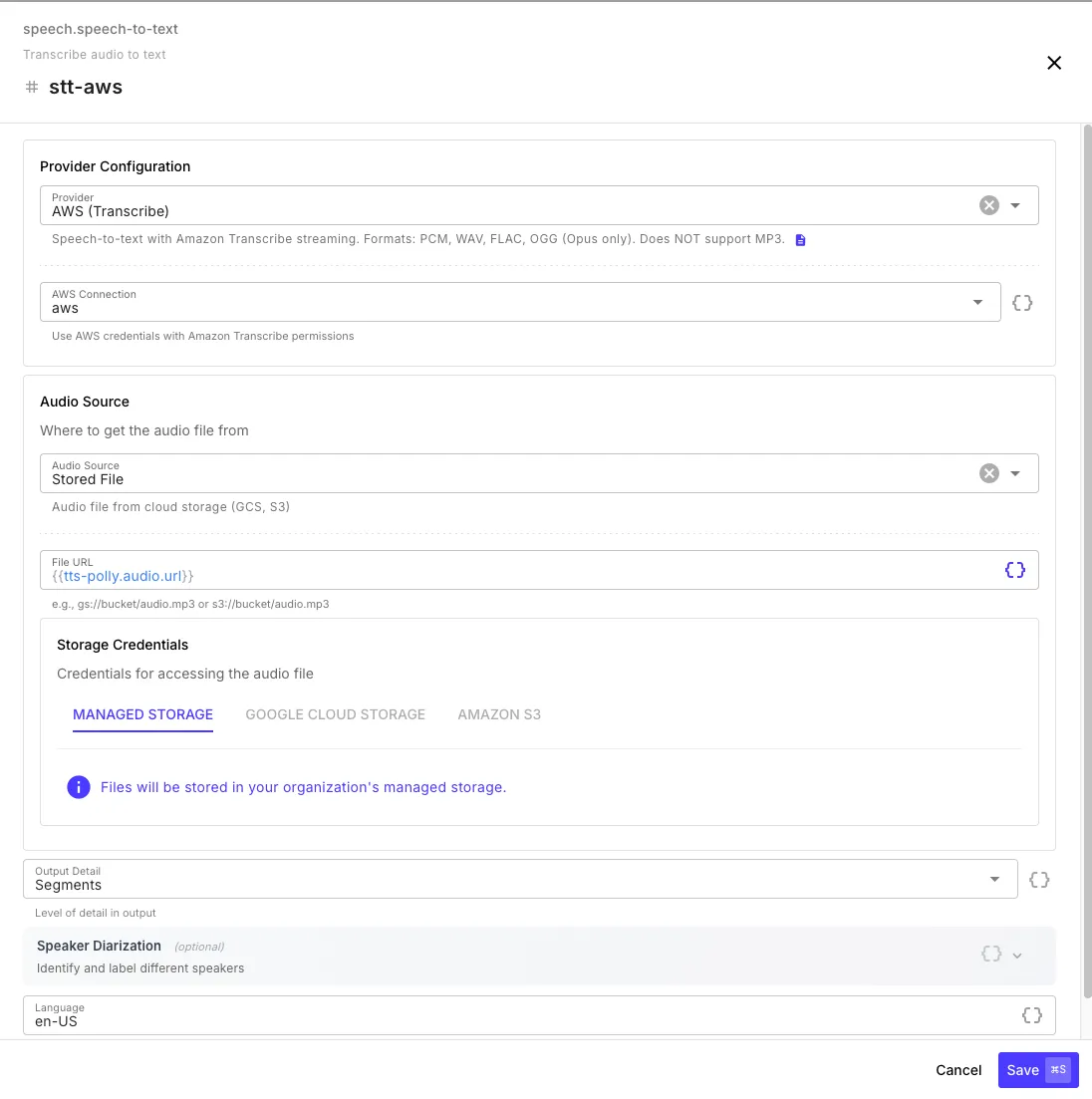
| Field | Description |
|---|---|
| Provider | OpenAI, ElevenLabs, Google Cloud, or AWS |
| Connection | API key or cloud credentials |
| Audio Source | Stored file (GCS, S3, managed) or base64 data |
| Output Detail | text (transcript only), segments (with timestamps), or full (includes VTT/SRT subtitles) |
| Speaker Diarization | Identify and label different speakers (not available with OpenAI) |
| Language | Language code (e.g., en-US) — leave empty for auto-detection |
Output
Section titled “Output”With text output detail:
{ "text": "Hello, this is a test recording.", "provider": "openai", "durationMs": 3200}With segments or full output detail:
{ "text": "Hello, this is a test recording.", "segments": [ { "text": "Hello, this is a test recording.", "start": 0.0, "end": 3.2, "confidence": 0.97 } ], "vtt": "WEBVTT\n\n00:00:00.000 --> 00:00:03.200\nHello, this is a test recording.", "srt": "1\n00:00:00,000 --> 00:00:03,200\nHello, this is a test recording.", "provider": "openai", "durationMs": 3200}Provider Notes
Section titled “Provider Notes”OpenAI (Whisper) — 25 MB file limit. No diarization or streaming. Best for simple transcription of shorter files. Supported languages
ElevenLabs (Scribe v1) — Supports diarization and streaming for large files. Good accuracy with speaker labeling. Supported languages
Google Cloud (Chirp 2) — Multiple models including a telephony-optimized model for call recordings. 10 MB synchronous limit, streams automatically for larger files. Supported languages
AWS (Transcribe) — Always uses streaming (no batch API). Supports PCM, WAV, FLAC, and OGG (Opus) — does not support MP3. Use an Audio Convert step first if your source is MP3. Supported languages