
Crypto Steps
The Crypto step provides nine cryptographic operations — hashing, HMAC, AES and RSA encryption/decryption, and key/password generation. Select the operation from a dropdown and the form adapts to show the relevant fields.
These are commonly needed for verifying webhook signatures, building API authentication headers, encrypting sensitive data in transit, and generating secure tokens.
Operations
Section titled “Operations”Create a one-way hash of data.
| Field | Description |
|---|---|
| Data | Text to hash |
| Algorithm | SHA-256 (default), SHA-512, or MD5 |
| Encoding | Hex (default) or Base64 |
Output: { "result": "a3f2b8c..." }
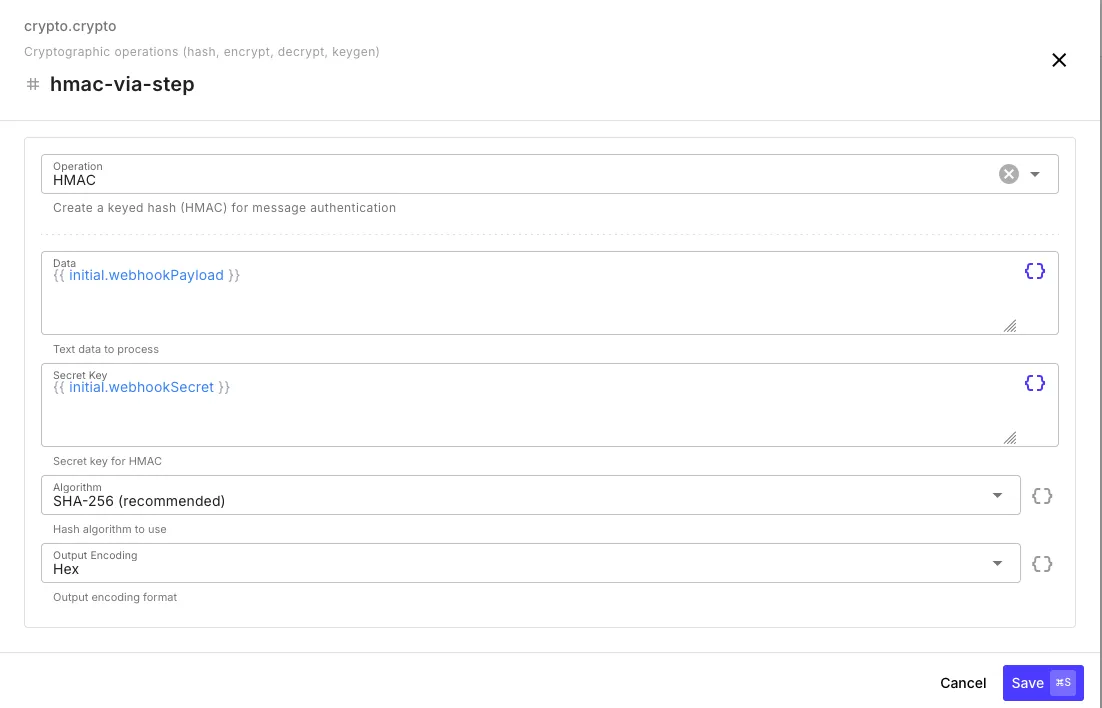
Create a keyed hash for message authentication — the standard way to verify webhook signatures.
| Field | Description |
|---|---|
| Data | Text to authenticate (e.g., the raw webhook payload) |
| Secret Key | Shared secret key |
| Algorithm | SHA-256 (default), SHA-512, or MD5 |
| Encoding | Hex (default) or Base64 |
Output: { "result": "d4e5f6a..." }
Encrypt (AES)
Section titled “Encrypt (AES)”Encrypt data using AES-256 symmetric encryption.
| Field | Description |
|---|---|
| Data | Text to encrypt |
| Key | AES-256 key (hex, base64, or raw string — raw strings are hashed to derive the key) |
| Algorithm | AES-256-GCM (default, recommended) or AES-256-CBC |
| Encoding | Hex (default) or Base64 |
Output: { "result": "encrypted...", "iv": "abc123...", "authTag": "def456..." }
The iv (initialization vector) and authTag (GCM only) are required for decryption. Pass the full output object to the Decrypt step.
Decrypt (AES)
Section titled “Decrypt (AES)”Decrypt AES-encrypted data. Accepts the output from an Encrypt step directly.
| Field | Description |
|---|---|
| Data | Encrypted data — accepts the Encrypt step’s output object, a JSON string, or individual fields |
| Key | Same key used for encryption |
| Algorithm | Must match the encryption algorithm |
| Encoding | Must match the encryption encoding |
Output: { "result": "original text" }
Encrypt (RSA)
Section titled “Encrypt (RSA)”Encrypt data using an RSA public key.
| Field | Description |
|---|---|
| Data | Text to encrypt |
| Key | RSA public key in PEM format |
| Padding | OAEP (default, recommended) or PKCS#1 v1.5 |
| OAEP Hash | SHA-256 (default), SHA-384, or SHA-512 |
| Encoding | Base64 (default) or Hex |
Output: { "result": "encrypted..." }
Decrypt (RSA)
Section titled “Decrypt (RSA)”Decrypt RSA-encrypted data using a private key.
| Field | Description |
|---|---|
| Data | Encrypted string |
| Key | RSA private key in PEM format |
| Padding | Must match encryption padding |
| OAEP Hash | Must match encryption hash |
| Encoding | Must match encryption encoding |
Output: { "result": "original text" }
Generate RSA Keypair
Section titled “Generate RSA Keypair”Generate a new RSA public/private key pair.
| Field | Description |
|---|---|
| Key Size | 2048 (default), 3072, or 4096 bits |
Output: { "publicKey": "-----BEGIN PUBLIC KEY-----...", "privateKey": "-----BEGIN PRIVATE KEY-----..." }
Generate AES Key
Section titled “Generate AES Key”Generate a random AES-256 encryption key (32 bytes).
| Field | Description |
|---|---|
| Encoding | Hex (default) or Base64 |
Output: { "key": "a1b2c3d4..." }
Generate Password
Section titled “Generate Password”Generate a secure random password.
| Field | Description |
|---|---|
| Length | 4–128 characters (default: 16) |
| Characters | All, alphanumeric, alpha, uppercase, lowercase, numbers, or special |
Output: { "password": "xK9#mP2&..." }
Common Patterns
Section titled “Common Patterns”Verifying a Webhook Signature
Section titled “Verifying a Webhook Signature”Most services sign webhook payloads with HMAC. Here’s a typical verification flow:
- Crypto (HMAC) — compute
HMAC-SHA256of{{ initial.rawBody }}with the shared secret - If — compare
{{ crypto-hmac.result }}against{{ initial.headers.x-signature }} - Continue or return a 401
Encrypting Data Before Storage
Section titled “Encrypting Data Before Storage”- Generate AES Key — or load one from
{{ $env.ENCRYPTION_KEY }} - Encrypt (AES) — encrypt the sensitive value
- Data Store Set — store the encrypted result
- Decrypt (AES) — retrieve and decrypt when needed
Building an API Auth Signature
Section titled “Building an API Auth Signature”Some APIs (AWS Signature V4, Twilio) require HMAC-based authentication headers:
{{ crypto-hmac.result }}Use the HMAC step to compute the signature, then pass it as a header in an HTTP step.