
Control Flow
If Step
Section titled “If Step”The if step evaluates a condition and executes either the Then branch or the Else branch. The condition is built using the same visual condition builder as the filter step — pick fields, operators, and values.
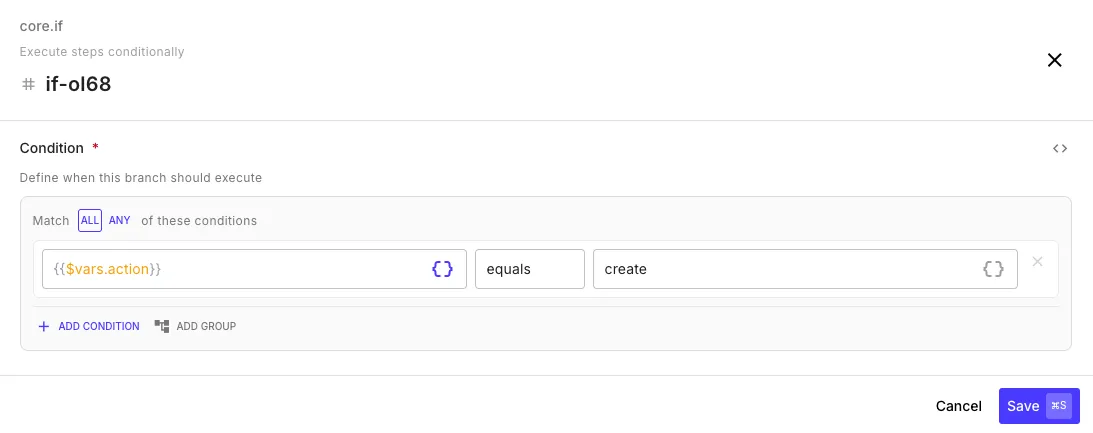
Each branch contains its own set of nested steps that you add in the builder.
Output available to later steps:
{{ my-if-step.conditionResult }} // true or false{{ my-if-step.branch }} // "then", "else", or "none"Switch Step
Section titled “Switch Step”The switch step evaluates multiple cases in order — the first case whose condition matches is executed. You can add an optional Default branch as a fallback.
Each case has a label, a condition (using the visual condition builder), and a set of nested steps.
For-Each Step
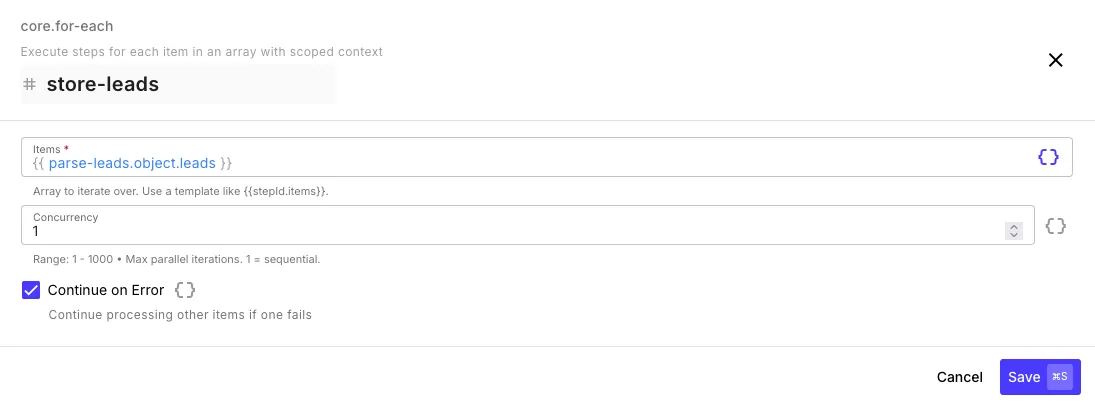
Section titled “For-Each Step”The for-each step loops over an array and executes nested steps for each item.
| Field | Description |
|---|---|
| Items | The array to iterate over (e.g., {{ fetch-users.data }}) |
| Concurrency | How many items to process in parallel (default: 1 = sequential) |
| Continue on Error | If enabled, keeps processing remaining items when one fails |
Inside the loop, you have access to:
{{ $item }}— current item{{ $index }}— iteration index (0-based){{ $isFirst }}/{{ $isLast }}— boundary flags
$vars mutations inside a for-each persist across iterations, so you can use set-variable steps to maintain running counters or accumulators.
Output:
{{ process-items.count }} // total items processed{{ process-items.succeeded }} // successful iterations{{ process-items.failed }} // failed iterations{{ process-items.items }} // array of results per iteration